
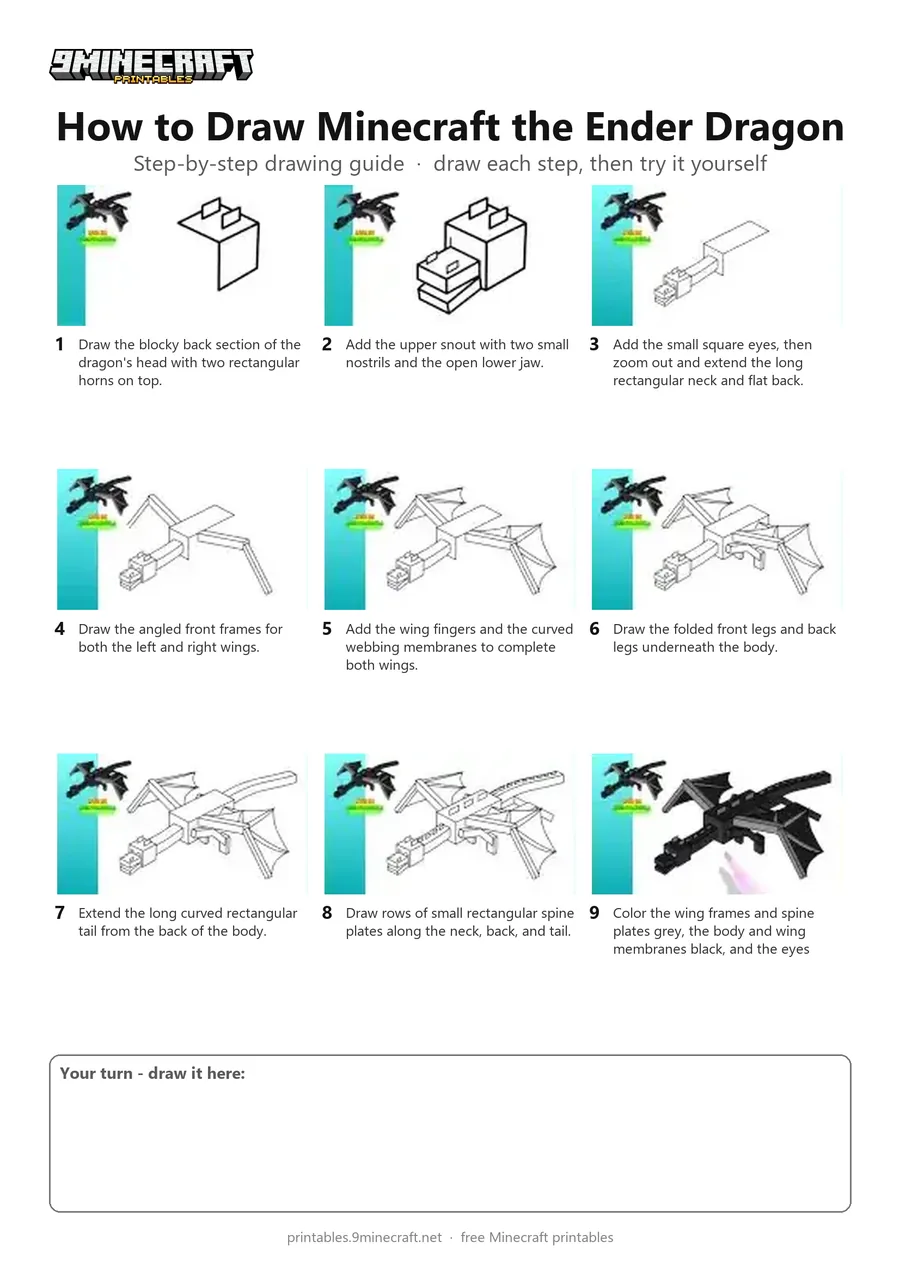
This tutorial shows how to draw the blocky 3D Ender Dragon from Minecraft in full flight. It breaks down the complex isometric shapes line by line, starting from the head and finishing with black, grey, and purple coloring. Free printable PDF for A4 and US Letter paper.
Print at 100% scale (“Actual size”). Plain printer paper works fine; crayons, colored pencils or markers all work.
 Draw the blocky back section of the dragon's head with two rectangular horns on top.
 Add the upper snout with two small nostrils and the open lower jaw.
 Add the small square eyes, then zoom out and extend the long rectangular neck and flat back.
 Draw the angled front frames for both the left and right wings.
 Add the wing fingers and the curved webbing membranes to complete both wings.
 Draw the folded front legs and back legs underneath the body.
 Extend the long curved rectangular tail from the back of the body.
 Draw rows of small rectangular spine plates along the neck, back, and tail.
 Color the wing frames and spine plates grey, the body and wing membranes black, and the eyes purple.
You need: pen, markers.
Video by Liga da Brincadeira - Como Desenhar on YouTube.
 More How to Draw
 PDFHow to Draw Minecraft an Ender DragonDetailed · Ages 10+
 PDFHow to Draw Minecraft an Ender Dragon (Design 2)Detailed · Ages 10+
 PDFHow to Draw Minecraft the Ender DragonDetailed · Ages 10+
 PDFHow to Draw Minecraft the Ender Dragon (Design 3)Detailed · Ages 10+
 PDFHow to Draw 3D Alex from MinecraftDetailed · Ages 10+
 PDFHow to Draw a Minecraft RavagerDetailed · Ages 10+
 PDFHow to Draw Minecraft the Wither StormDetailed · Ages 10+
 PDFHow to Draw Minecraft a 3D Floating CreeperDetailed · Ages 10+
 PDFHow to Draw a 3D Minecraft ZombieDetailed · Ages 10+
 PDFHow to Draw Minecraft a Chicken Jockey (Design 4)Detailed · Ages 10+
 PDFHow to Draw a Minecraft SheepDetailed · Ages 10+
 PDFHow to Draw a Minecraft WolfDetailed · Ages 10+