
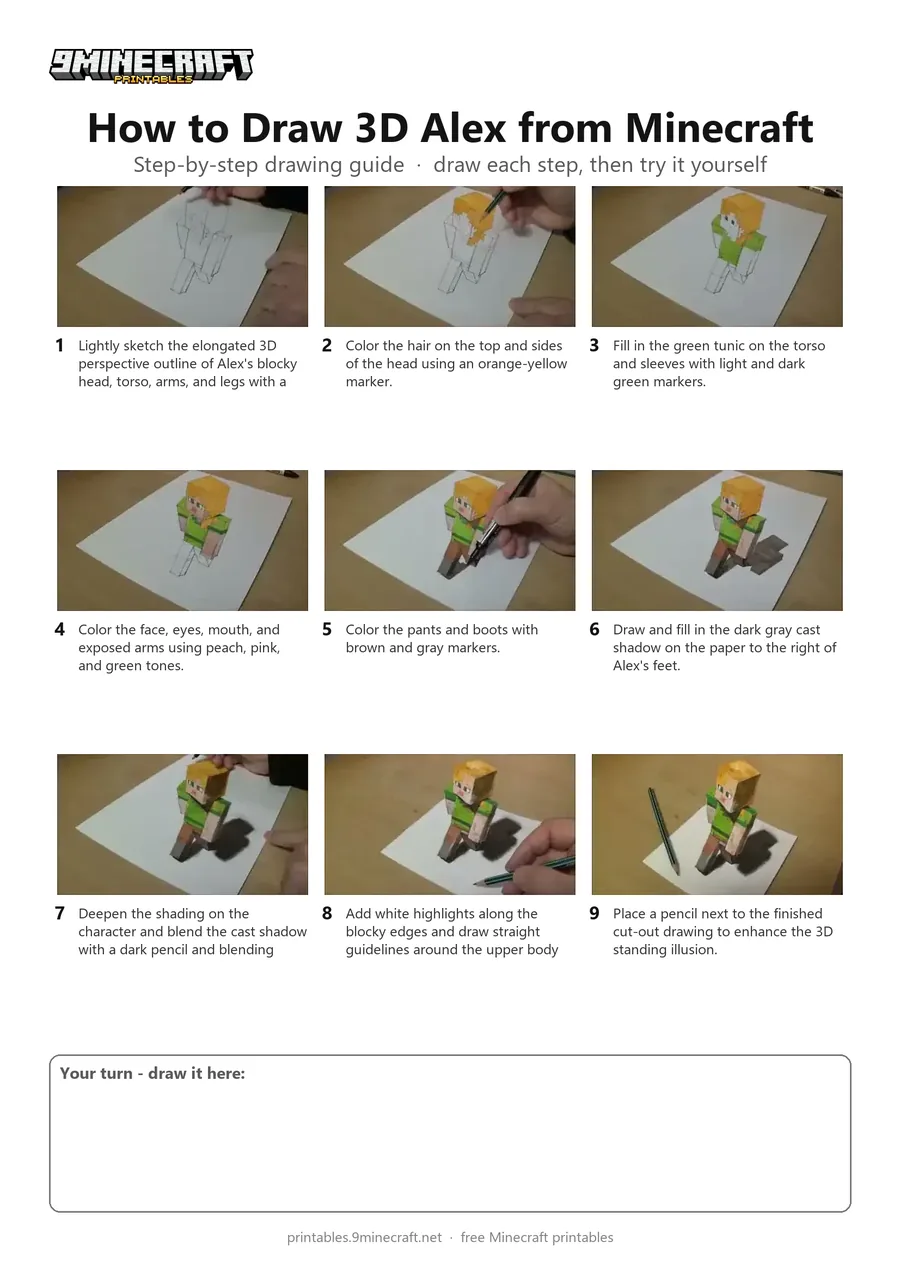
This tutorial demonstrates how to draw an anamorphic 3D optical illusion of Alex from Minecraft standing upright on a sheet of paper. The artist sketches the elongated perspective, colors the blocky textures with markers, shades a realistic cast shadow, and cuts away the top edges of the paper to complete the 3D effect. Free printable PDF for A4 and US Letter paper.
Print at 100% scale (“Actual size”). Plain printer paper works fine; crayons, colored pencils or markers all work.
 Lightly sketch the elongated 3D perspective outline of Alex's blocky head, torso, arms, and legs with a pencil.
 Color the hair on the top and sides of the head using an orange-yellow marker.
 Fill in the green tunic on the torso and sleeves with light and dark green markers.
 Color the face, eyes, mouth, and exposed arms using peach, pink, and green tones.
 Color the pants and boots with brown and gray markers.
 Draw and fill in the dark gray cast shadow on the paper to the right of Alex's feet.
 Deepen the shading on the character and blend the cast shadow with a dark pencil and blending cloth.
 Add white highlights along the blocky edges and draw straight guidelines around the upper body to cut away the top portion of the paper.
 Place a pencil next to the finished cut-out drawing to enhance the 3D standing illusion.
You need: pencil, colored markers, colored pencils, ruler, craft knife.
Video by Vamos ART on YouTube.
 More How to Draw
 PDFHow to Draw Minecraft an Ender DragonDetailed · Ages 10+
 PDFHow to Draw Minecraft the Ender DragonDetailed · Ages 10+
 PDFHow to Draw Minecraft a 3D Floating CreeperDetailed · Ages 10+
 PDFHow to Draw a 3D Minecraft ZombieDetailed · Ages 10+
 PDFHow to Draw a Minecraft WolfDetailed · Ages 10+
 PDFHow to Draw Alex from MinecraftSimple · Ages 7-9
 PDFHow to Draw Alex from Minecraft (Design 2)Cute / chibi · Ages 7-9
 PDFHow to Draw Minecraft an Enderman (Design 3)Detailed · Ages 7-9
 PDFHow to Draw Minecraft an AllayPixel style · Ages 7-9
 PDFHow to Draw Minecraft a Baby Happy GhastCute / chibi · Ages 7-9
 PDFHow to Draw a Minecraft BeePixel style · Ages 7-9
 PDFHow to Draw a Minecraft CatPixel style · Ages 7-9