
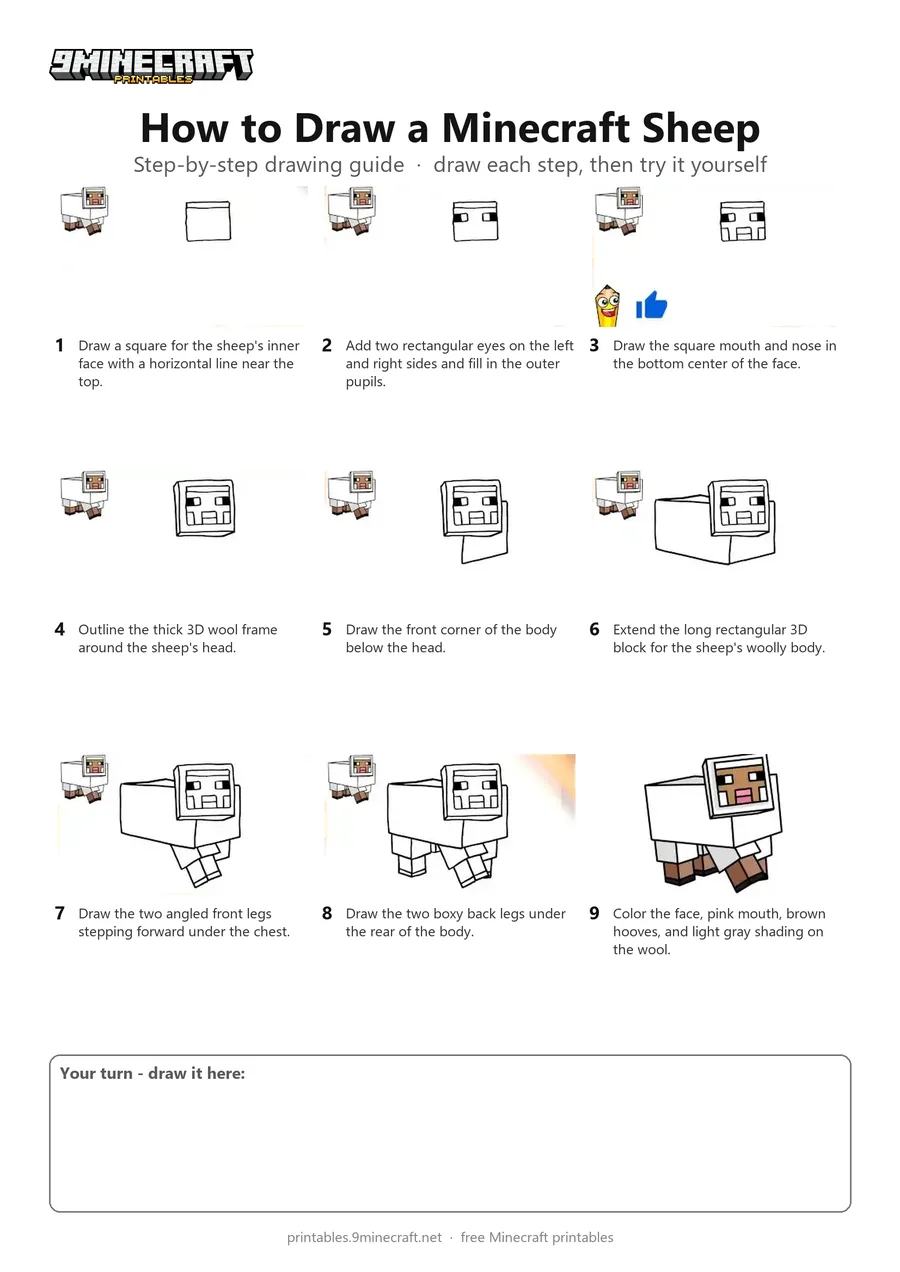
Learn how to draw a 3D blocky Minecraft sheep walking forward. Follow the easy marker lines step by step from the face to the woolly body and legs. Free printable PDF for A4 and US Letter paper.
Print at 100% scale (“Actual size”). Plain printer paper works fine; crayons, colored pencils or markers all work.
 Draw a square for the sheep's inner face with a horizontal line near the top.
 Add two rectangular eyes on the left and right sides and fill in the outer pupils.
 Draw the square mouth and nose in the bottom center of the face.
 Outline the thick 3D wool frame around the sheep's head.
 Draw the front corner of the body below the head.
 Extend the long rectangular 3D block for the sheep's woolly body.
 Draw the two angled front legs stepping forward under the chest.
 Draw the two boxy back legs under the rear of the body.
 Color the face, pink mouth, brown hooves, and light gray shading on the wool.
You need: black marker, colors.
Video by HappyART on YouTube.
 More How to Draw
 PDFHow to Draw a Minecraft Sheep in PerspectivePixel style · Ages 7-9
 PDFHow to Draw Alex from Minecraft (Design 6)Pixel style · Ages 7-9
 PDFHow to Draw a Minecraft AxolotlPixel style · Ages 7-9
 PDFHow to Draw a Minecraft Bee (Design 3)Pixel style · Ages 7-9
 PDFHow to Draw a Minecraft Bee (Design 4)Pixel style · Ages 7-9
 PDFHow to Draw a Minecraft ChickenPixel style · Ages 7-9
 PDFHow to Draw a Minecraft Chicken (Design 3)Pixel style · Ages 7-9
 PDFHow to Draw Minecraft Diamond Armor StevePixel style · Ages 7-9
 PDFHow to Draw a Minecraft Diamond (Design 2)Pixel style · Ages 7-9
 PDFHow to Draw a Minecraft Diamond (Design 3)Pixel style · Ages 7-9
 PDFHow to Draw a Minecraft Diamond Pickaxe (Design 2)Pixel style · Ages 7-9
 PDFHow to Draw a Minecraft Diamond Sword (Design 4)Pixel style · Ages 7-9