
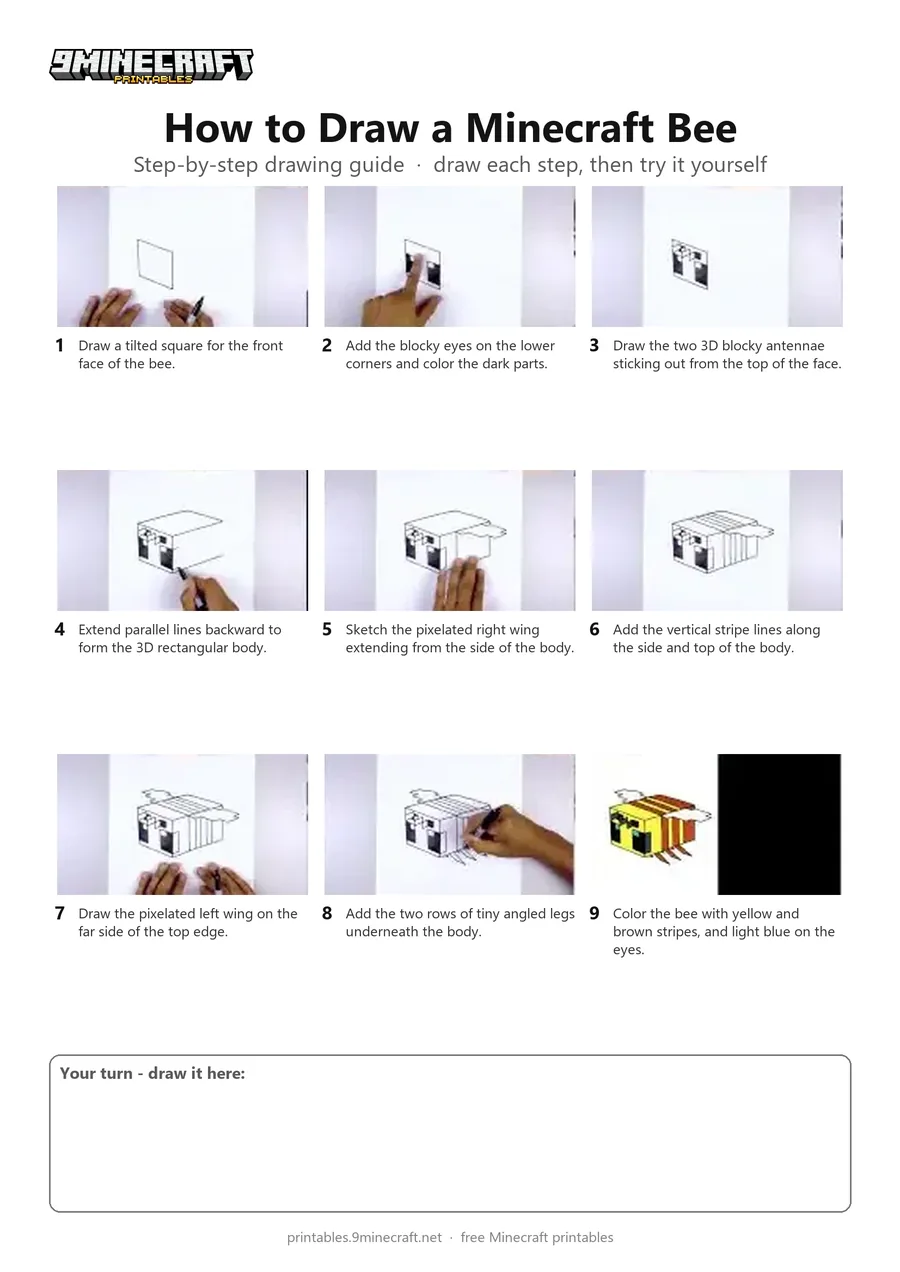
Learn how to draw a 3D blocky Minecraft Bee complete with pixel wings, antennae, and stripes. This tutorial breaks down the isometric cube shape into simple lines that are easy to follow and color. Free printable PDF for A4 and US Letter paper.
Print at 100% scale (“Actual size”). Plain printer paper works fine; crayons, colored pencils or markers all work.
 Draw a tilted square for the front face of the bee.
 Add the blocky eyes on the lower corners and color the dark parts.
 Draw the two 3D blocky antennae sticking out from the top of the face.
 Extend parallel lines backward to form the 3D rectangular body.
 Sketch the pixelated right wing extending from the side of the body.
 Add the vertical stripe lines along the side and top of the body.
 Draw the pixelated left wing on the far side of the top edge.
 Add the two rows of tiny angled legs underneath the body.
 Color the bee with yellow and brown stripes, and light blue on the eyes.
You need: paper, black marker, colored markers.
Video by Cartooning Club How to Draw on YouTube.
 More How to Draw
 PDFHow to Draw a Minecraft AxolotlPixel style · Ages 7-9
 PDFHow to Draw a Minecraft BeePixel style · Ages 7-9
 PDFHow to Draw a Minecraft ChickenPixel style · Ages 7-9
 PDFHow to Draw Minecraft Diamond Armor StevePixel style · Ages 7-9
 PDFHow to Draw a Minecraft Diamond (Design 2)Pixel style · Ages 7-9
 PDFHow to Draw a Minecraft Diamond (Design 3)Pixel style · Ages 7-9
 PDFHow to Draw a Minecraft Diamond Sword (Design 4)Pixel style · Ages 7-9
 PDFHow to Draw a Minecraft Diamond Sword (Design 5)Pixel style · Ages 7-9
 PDFHow to Draw a Minecraft Frog Eating a Magma CubePixel style · Ages 7-9
 PDFHow to Draw a Minecraft Ghast (Design 2)Pixel style · Ages 7-9
 PDFHow to Draw Herobrine from Minecraft (Design 2)Pixel style · Ages 7-9
 PDFHow to Draw Minecraft an Iron Golem (Design 2)Pixel style · Ages 7-9