
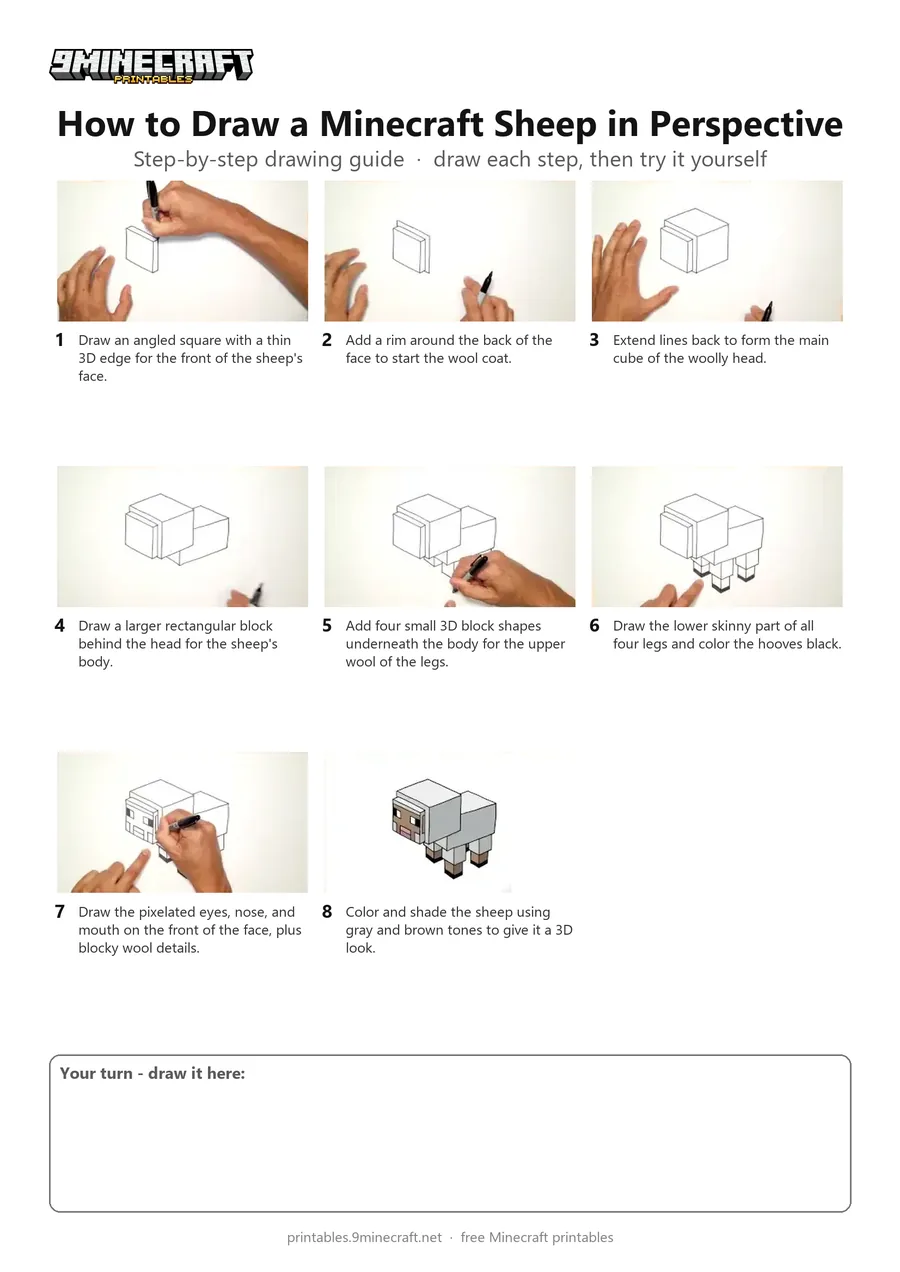
This tutorial shows how to draw a 3D blocky Minecraft sheep in perspective using simple straight lines and cubes. You will build the head, wool coat, body, and legs step by step before adding the pixelated face details and shading. Free printable PDF for A4 and US Letter paper.
Print at 100% scale (“Actual size”). Plain printer paper works fine; crayons, colored pencils or markers all work.
 Draw an angled square with a thin 3D edge for the front of the sheep's face.
 Add a rim around the back of the face to start the wool coat.
 Extend lines back to form the main cube of the woolly head.
 Draw a larger rectangular block behind the head for the sheep's body.
 Add four small 3D block shapes underneath the body for the upper wool of the legs.
 Draw the lower skinny part of all four legs and color the hooves black.
 Draw the pixelated eyes, nose, and mouth on the front of the face, plus blocky wool details.
 Color and shade the sheep using gray and brown tones to give it a 3D look.
You need: paper, black marker, colored pencils.
Video by Cartooning Club How to Draw on YouTube.
 More How to Draw
 PDFHow to Draw a Minecraft AxolotlPixel style · Ages 7-9
 PDFHow to Draw a Minecraft Bee (Design 3)Pixel style · Ages 7-9
 PDFHow to Draw a Minecraft ChickenPixel style · Ages 7-9
 PDFHow to Draw Minecraft Diamond Armor StevePixel style · Ages 7-9
 PDFHow to Draw a Minecraft Diamond (Design 2)Pixel style · Ages 7-9
 PDFHow to Draw a Minecraft Diamond (Design 3)Pixel style · Ages 7-9
 PDFHow to Draw a Minecraft Diamond Sword (Design 4)Pixel style · Ages 7-9
 PDFHow to Draw a Minecraft Diamond Sword (Design 5)Pixel style · Ages 7-9
 PDFHow to Draw a Minecraft Frog Eating a Magma CubePixel style · Ages 7-9
 PDFHow to Draw a Minecraft Ghast (Design 2)Pixel style · Ages 7-9
 PDFHow to Draw Herobrine from Minecraft (Design 2)Pixel style · Ages 7-9
 PDFHow to Draw Minecraft an Iron Golem (Design 2)Pixel style · Ages 7-9