
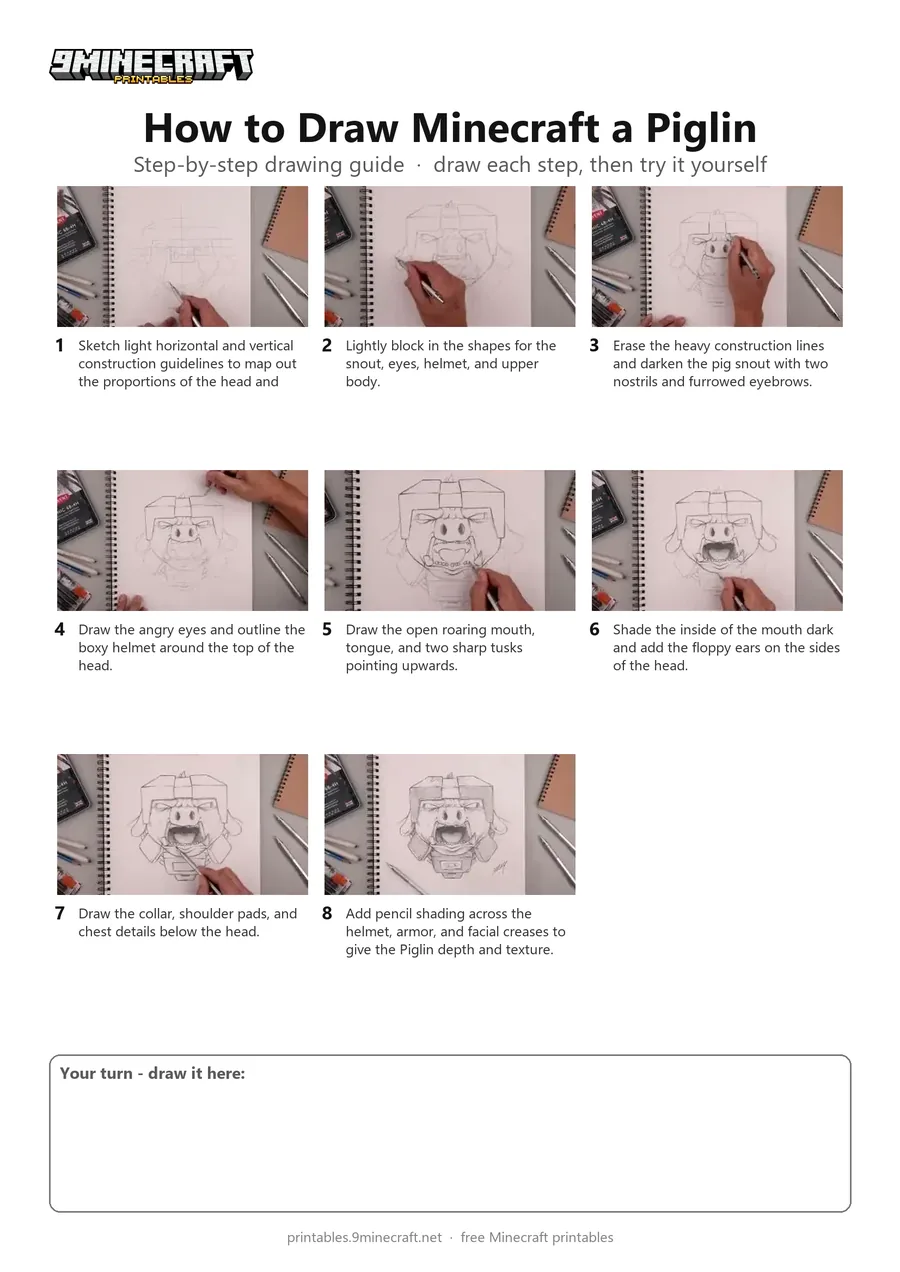
This advanced tutorial teaches how to sketch and shade a detailed, stylized Minecraft Piglin head and torso using pencil. It begins with light proportional guidelines before building up the helmet, facial features, tusks, and shading. Free printable PDF for A4 and US Letter paper.
Print at 100% scale (“Actual size”). Plain printer paper works fine; crayons, colored pencils or markers all work.
 Sketch light horizontal and vertical construction guidelines to map out the proportions of the head and face.
 Lightly block in the shapes for the snout, eyes, helmet, and upper body.
 Erase the heavy construction lines and darken the pig snout with two nostrils and furrowed eyebrows.
 Draw the angry eyes and outline the boxy helmet around the top of the head.
 Draw the open roaring mouth, tongue, and two sharp tusks pointing upwards.
 Shade the inside of the mouth dark and add the floppy ears on the sides of the head.
 Draw the collar, shoulder pads, and chest details below the head.
 Add pencil shading across the helmet, armor, and facial creases to give the Piglin depth and texture.
You need: pencil, eraser, paper.
Video by Cartooning Club XL on YouTube.
 More How to Draw
 PDFHow to Draw 3D Alex from MinecraftDetailed · Ages 10+
 PDFHow to Draw Minecraft a Chicken Jockey (Design 5)Detailed · Ages 10+
 PDFHow to Draw Minecraft an Ender DragonDetailed · Ages 10+
 PDFHow to Draw Minecraft an Ender Dragon (Design 2)Detailed · Ages 10+
 PDFHow to Draw a Minecraft RavagerDetailed · Ages 10+
 PDFHow to Draw Minecraft a RavagerDetailed · Ages 10+
 PDFHow to Draw Minecraft the Ender DragonDetailed · Ages 10+
 PDFHow to Draw Minecraft the Ender Dragon (Design 2)Detailed · Ages 10+
 PDFHow to Draw Minecraft the Ender Dragon (Design 3)Detailed · Ages 10+
 PDFHow to Draw Minecraft the Wither StormDetailed · Ages 10+
 PDFHow to Draw Minecraft a 3D Floating CreeperDetailed · Ages 10+
 PDFHow to Draw a 3D Minecraft ZombieDetailed · Ages 10+