
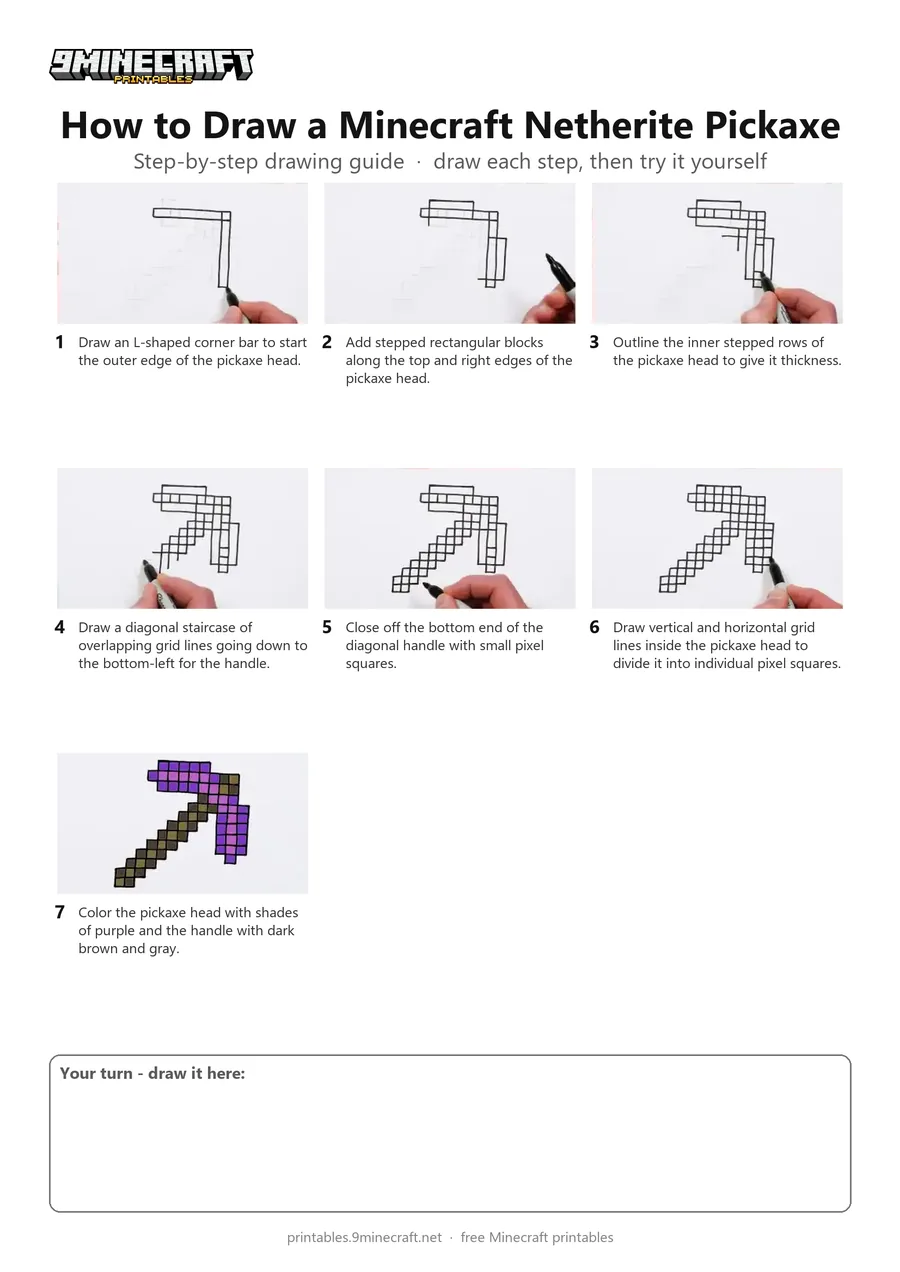
This tutorial shows how to draw a pixelated Minecraft Netherite Pickaxe using a grid-like block method. Starting with light pencil guidelines, the artist outlines each pixel square with a black marker before coloring the head purple and the handle brown. Free printable PDF for A4 and US Letter paper.
Print at 100% scale (“Actual size”). Plain printer paper works fine; crayons, colored pencils or markers all work.
 Draw an L-shaped corner bar to start the outer edge of the pickaxe head.
 Add stepped rectangular blocks along the top and right edges of the pickaxe head.
 Outline the inner stepped rows of the pickaxe head to give it thickness.
 Draw a diagonal staircase of overlapping grid lines going down to the bottom-left for the handle.
 Close off the bottom end of the diagonal handle with small pixel squares.
 Draw vertical and horizontal grid lines inside the pickaxe head to divide it into individual pixel squares.
 Color the pickaxe head with shades of purple and the handle with dark brown and gray.
You need: pencil, black marker, markers.
Video by Mister Brush on YouTube.
 More How to Draw
 PDFHow to Draw Minecraft Diamond Armor StevePixel style · Ages 7-9
 PDFHow to Draw a Minecraft PickaxePixel style · Ages 7-9
 PDFHow to Draw Alex from Minecraft (Design 6)Pixel style · Ages 7-9
 PDFHow to Draw a Minecraft AxolotlPixel style · Ages 7-9
 PDFHow to Draw a Minecraft Bee (Design 3)Pixel style · Ages 7-9
 PDFHow to Draw a Minecraft ChickenPixel style · Ages 7-9
 PDFHow to Draw a Minecraft Diamond (Design 2)Pixel style · Ages 7-9
 PDFHow to Draw a Minecraft Diamond (Design 3)Pixel style · Ages 7-9
 PDFHow to Draw a Minecraft Diamond Pickaxe (Design 2)Pixel style · Ages 7-9
 PDFHow to Draw a Minecraft Diamond Sword (Design 4)Pixel style · Ages 7-9
 PDFHow to Draw a Minecraft Diamond Sword (Design 5)Pixel style · Ages 7-9
 PDFHow to Draw an Evoker from MinecraftPixel style · Ages 7-9