
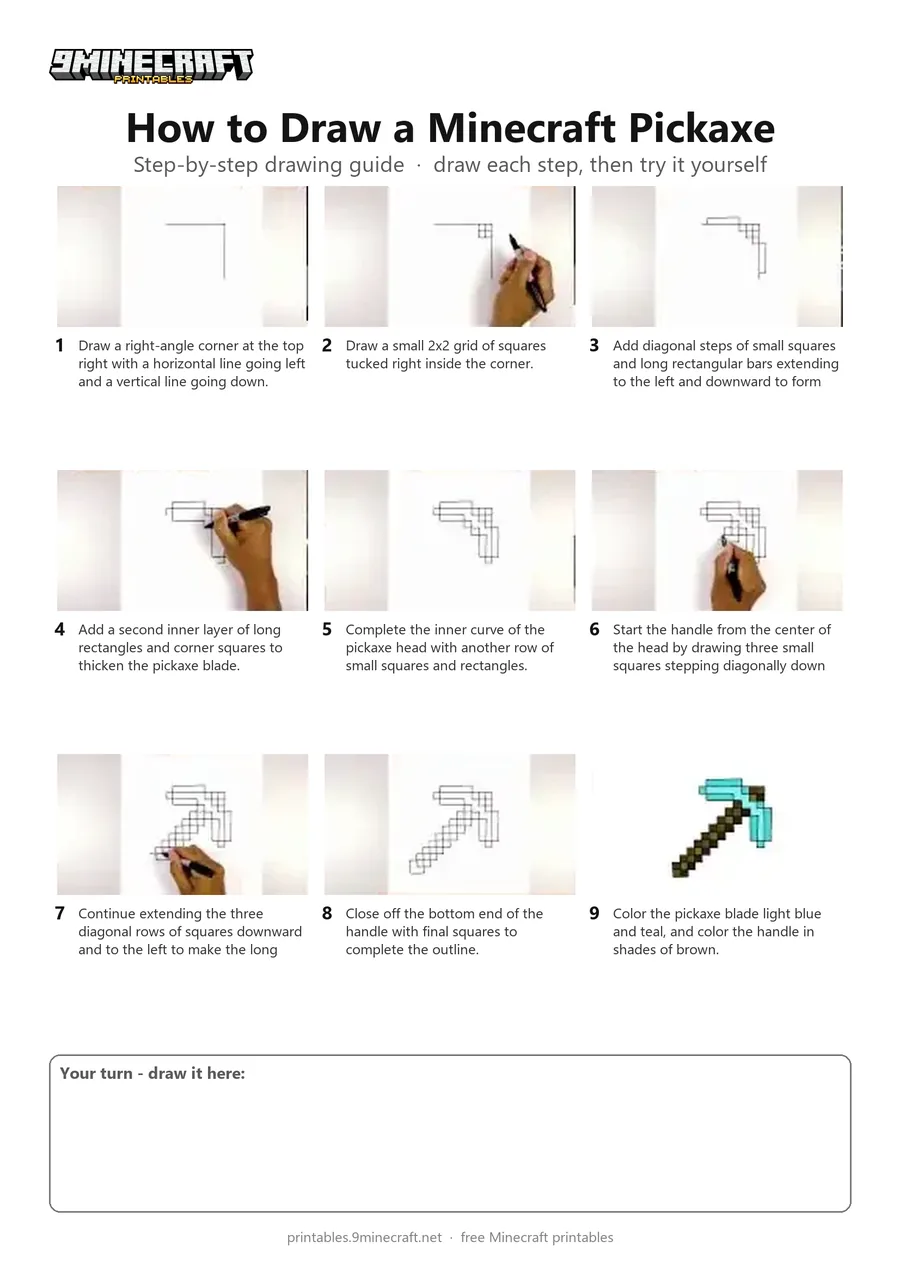
This tutorial shows how to draw a pixelated Minecraft diamond pickaxe freehand without graph paper. You start by drawing a corner guide and carefully adding rows of small squares for the blade and diagonal handle before coloring it in. Free printable PDF for A4 and US Letter paper.
Print at 100% scale (“Actual size”). Plain printer paper works fine; crayons, colored pencils or markers all work.
 Draw a right-angle corner at the top right with a horizontal line going left and a vertical line going down.
 Draw a small 2x2 grid of squares tucked right inside the corner.
 Add diagonal steps of small squares and long rectangular bars extending to the left and downward to form the outer edge of the pickaxe head.
 Add a second inner layer of long rectangles and corner squares to thicken the pickaxe blade.
 Complete the inner curve of the pickaxe head with another row of small squares and rectangles.
 Start the handle from the center of the head by drawing three small squares stepping diagonally down and to the left.
 Continue extending the three diagonal rows of squares downward and to the left to make the long wooden stick.
 Close off the bottom end of the handle with final squares to complete the outline.
 Color the pickaxe blade light blue and teal, and color the handle in shades of brown.
You need: paper, black marker, colored markers.
Video by Cartooning Club How to Draw on YouTube.
 More How to Draw
 PDFHow to Draw a Minecraft OcelotPixel style · Ages 7-9
 PDFHow to Draw a Minecraft ParrotPixel style · Ages 7-9
 PDFHow to Draw a Minecraft SpiderPixel style · Ages 7-9
 PDFHow to Draw a Minecraft SwordPixel style · Ages 7-9
 PDFHow to Draw Minecraft the WardenPixel style · Ages 7-9
 PDFHow to Draw a Minecraft Wolf (Dog)Pixel style · Ages 7-9
 PDFHow to Draw a Minecraft Zombie (Design 3)Pixel style · Ages 7-9
 PDFHow to Draw Minecraft an AllayPixel style · Ages 7-9
 PDFHow to Draw a Minecraft BeePixel style · Ages 7-9
 PDFHow to Draw a Minecraft CatPixel style · Ages 7-9
 PDFHow to Draw a Minecraft Chest Folding SurpriseCartoon · Ages 7-9
 PDFHow to Draw Minecraft Chibi DanTDMCute / chibi · Ages 7-9