
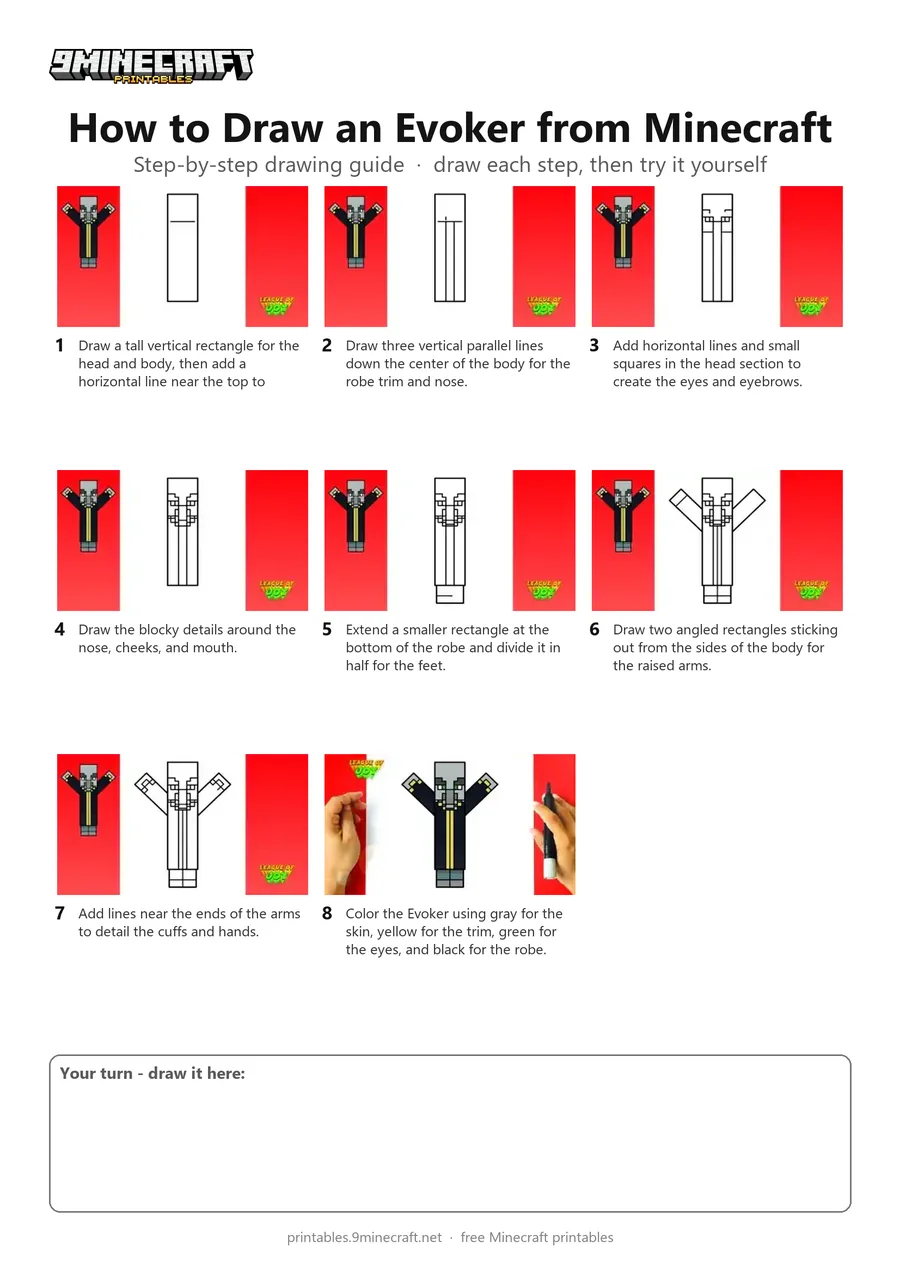
Learn how to draw an Evoker from Minecraft raising its arms to cast a spell. This tutorial breaks the blocky character down into simple straight lines and grid-like facial details before coloring it in. Free printable PDF for A4 and US Letter paper.
Print at 100% scale (“Actual size”). Plain printer paper works fine; crayons, colored pencils or markers all work.
 Draw a tall vertical rectangle for the head and body, then add a horizontal line near the top to separate the head.
 Draw three vertical parallel lines down the center of the body for the robe trim and nose.
 Add horizontal lines and small squares in the head section to create the eyes and eyebrows.
 Draw the blocky details around the nose, cheeks, and mouth.
 Extend a smaller rectangle at the bottom of the robe and divide it in half for the feet.
 Draw two angled rectangles sticking out from the sides of the body for the raised arms.
 Add lines near the ends of the arms to detail the cuffs and hands.
 Color the Evoker using gray for the skin, yellow for the trim, green for the eyes, and black for the robe.
You need: black pen, colored markers.
Video by League of Joy - How to Draw on YouTube.
 More How to Draw
 PDFHow to Draw Minecraft an EvokerPixel style · Ages 7-9
 PDFHow to Draw Alex from Minecraft (Design 6)Pixel style · Ages 7-9
 PDFHow to Draw a Minecraft AxolotlPixel style · Ages 7-9
 PDFHow to Draw a Minecraft Bee (Design 3)Pixel style · Ages 7-9
 PDFHow to Draw a Minecraft ChickenPixel style · Ages 7-9
 PDFHow to Draw Minecraft Diamond Armor StevePixel style · Ages 7-9
 PDFHow to Draw a Minecraft Diamond (Design 2)Pixel style · Ages 7-9
 PDFHow to Draw a Minecraft Diamond (Design 3)Pixel style · Ages 7-9
 PDFHow to Draw a Minecraft Diamond Pickaxe (Design 2)Pixel style · Ages 7-9
 PDFHow to Draw a Minecraft Diamond Sword (Design 4)Pixel style · Ages 7-9
 PDFHow to Draw a Minecraft Diamond Sword (Design 5)Pixel style · Ages 7-9
 PDFHow to Draw a Minecraft Frog Eating a Magma CubePixel style · Ages 7-9