
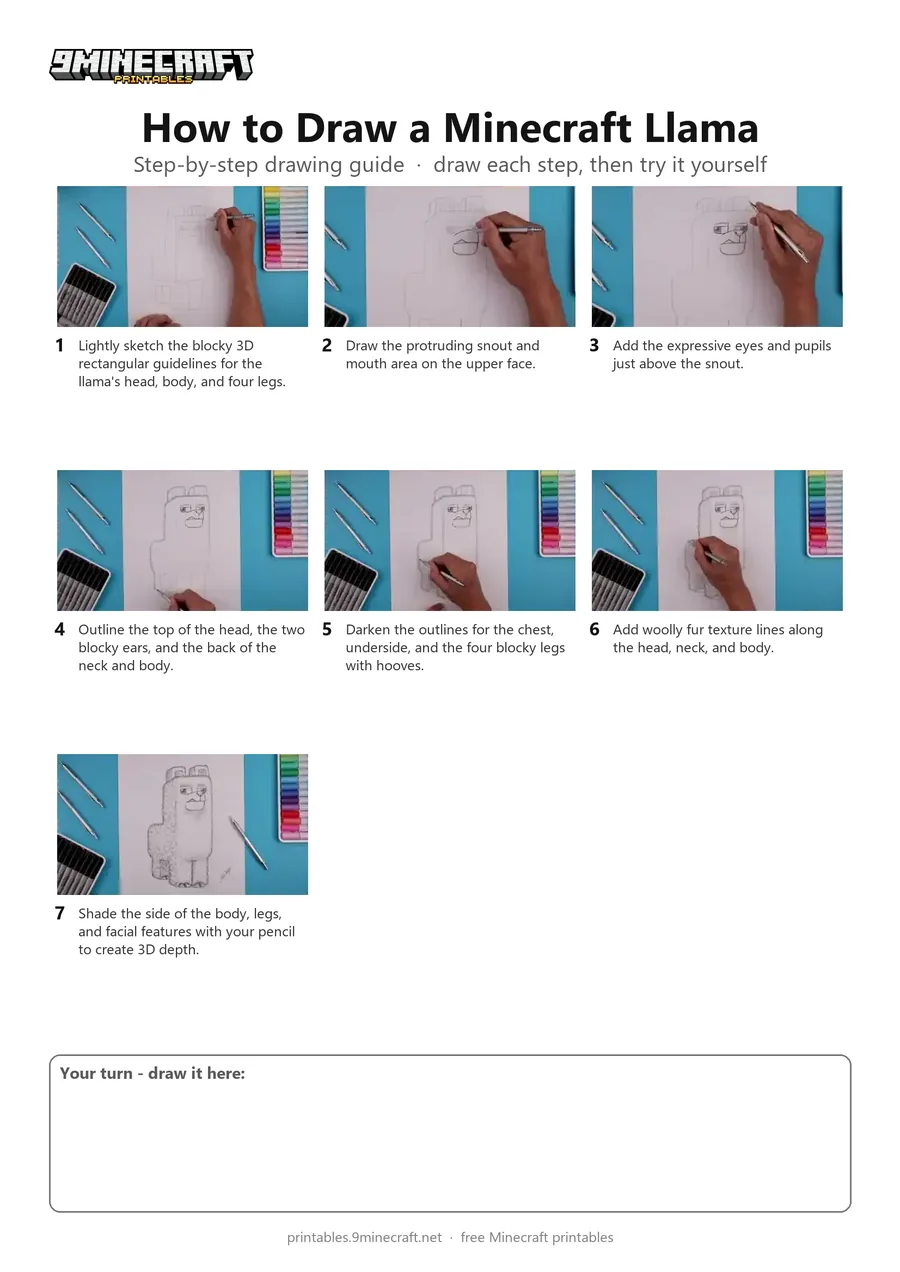
This tutorial shows how to sketch and shade a 3D blocky Minecraft Llama with cartoon eyes and fur texture using a pencil. It starts with light geometric guidelines before darkening the outlines and adding shading. Free printable PDF for A4 and US Letter paper.
Print at 100% scale (“Actual size”). Plain printer paper works fine; crayons, colored pencils or markers all work.
 Lightly sketch the blocky 3D rectangular guidelines for the llama's head, body, and four legs.
 Draw the protruding snout and mouth area on the upper face.
 Add the expressive eyes and pupils just above the snout.
 Outline the top of the head, the two blocky ears, and the back of the neck and body.
 Darken the outlines for the chest, underside, and the four blocky legs with hooves.
 Add woolly fur texture lines along the head, neck, and body.
 Shade the side of the body, legs, and facial features with your pencil to create 3D depth.
You need: pencil, paper, eraser.
Video by Cartooning Club How to Draw on YouTube.
 More How to Draw
 PDFHow to Draw Minecraft a 3D Floating CreeperDetailed · Ages 10+
 PDFHow to Draw a 3D Minecraft ZombieDetailed · Ages 10+
 PDFHow to Draw Minecraft a Chicken Jockey (Design 4)Detailed · Ages 10+
 PDFHow to Draw a Minecraft SheepDetailed · Ages 10+
 PDFHow to Draw a Minecraft WolfDetailed · Ages 10+
 PDFHow to Draw 3D Alex from MinecraftDetailed · Ages 10+
 PDFHow to Draw a 3D Minecraft CreeperDetailed · Ages 7-9
 PDFHow to Draw a Minecraft BlazeSimple · Ages 10+
 PDFHow to Draw Minecraft a Chicken Jockey (Design 5)Detailed · Ages 10+
 PDFHow to Draw Minecraft an Ender DragonDetailed · Ages 10+
 PDFHow to Draw Minecraft an Ender Dragon (Design 2)Detailed · Ages 10+
 PDFHow to Draw Minecraft an Enderman (Design 3)Detailed · Ages 7-9