
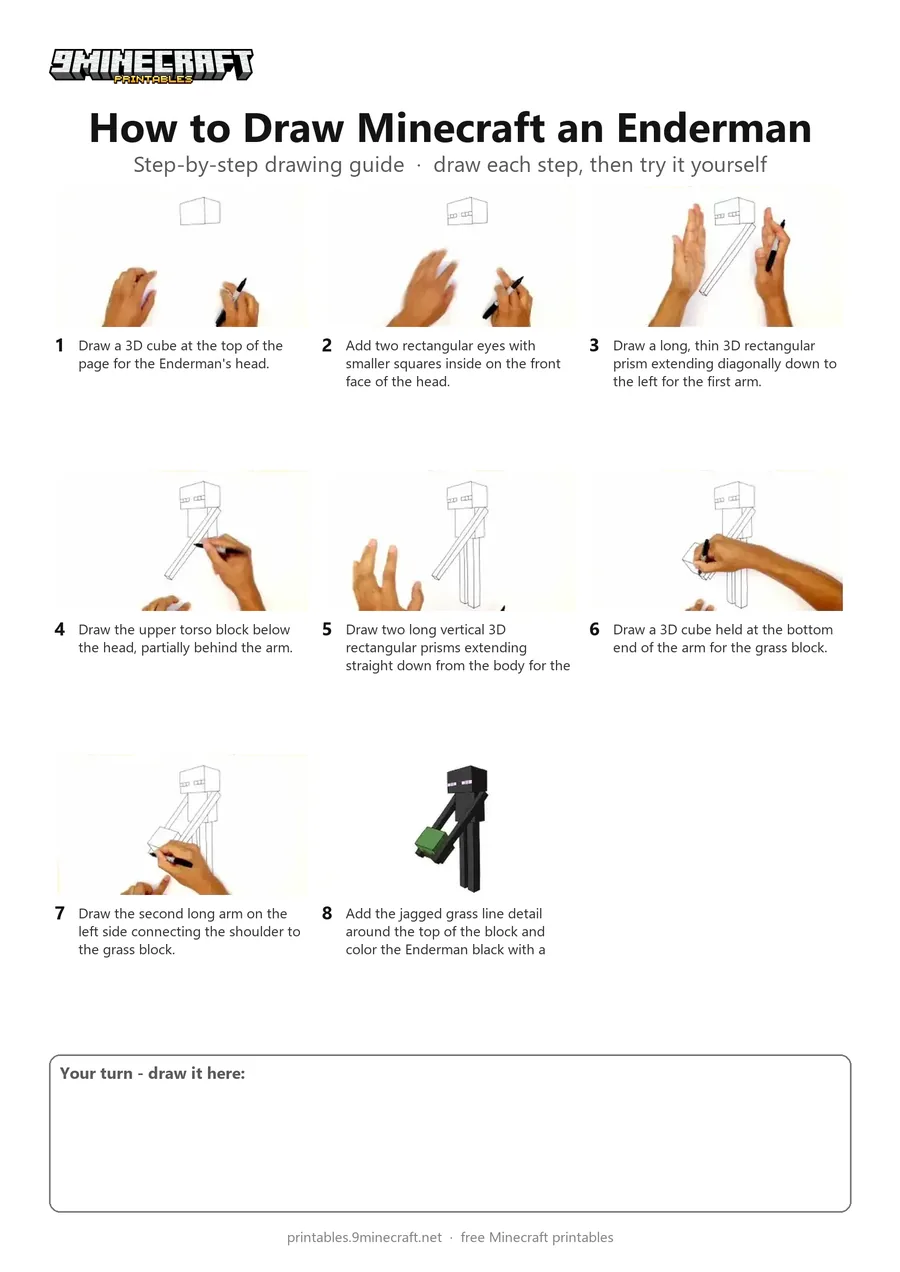
Learn how to draw a 3D Minecraft Enderman holding a grass block step by step using a black marker. The tutorial breaks down the blocky perspective into simple straight lines that are easy to follow and color. Free printable PDF for A4 and US Letter paper.
Print at 100% scale (“Actual size”). Plain printer paper works fine; crayons, colored pencils or markers all work.
 Draw a 3D cube at the top of the page for the Enderman's head.
 Add two rectangular eyes with smaller squares inside on the front face of the head.
 Draw a long, thin 3D rectangular prism extending diagonally down to the left for the first arm.
 Draw the upper torso block below the head, partially behind the arm.
 Draw two long vertical 3D rectangular prisms extending straight down from the body for the legs.
 Draw a 3D cube held at the bottom end of the arm for the grass block.
 Draw the second long arm on the left side connecting the shoulder to the grass block.
 Add the jagged grass line detail around the top of the block and color the Enderman black with a green and brown grass block.
You need: paper, black marker, colored markers.
Video by Cartooning Club How to Draw on YouTube.
 More How to Draw
 PDFHow to Draw Minecraft an Enderman (Design 5)Simple · Ages 7-9
 PDFHow to Draw Minecraft a 3D Floating CreeperDetailed · Ages 10+
 PDFHow to Draw a 3D Minecraft ZombieDetailed · Ages 10+
 PDFHow to Draw a Minecraft Chest Folding SurpriseCartoon · Ages 7-9
 PDFHow to Draw Minecraft Chibi DanTDMCute / chibi · Ages 7-9
 PDFHow to Draw Minecraft a Chicken JockeyCartoon · Ages 7-9
 PDFHow to Draw a Minecraft CreeperCartoon · Ages 7-9
 PDFHow to Draw Minecraft an EndermanSimple · Ages 7-9
 PDFHow to Draw Minecraft an Enderman (Design 4)Cute / chibi · Ages 7-9
 PDFHow to Draw Minecraft an Exploding Creeper Folding SurpriseCartoon · Ages 7-9
 PDFHow to Draw a Minecraft Frog Eating a Magma CubePixel style · Ages 7-9
 PDFHow to Draw a Minecraft Ghast (Design 2)Pixel style · Ages 7-9