
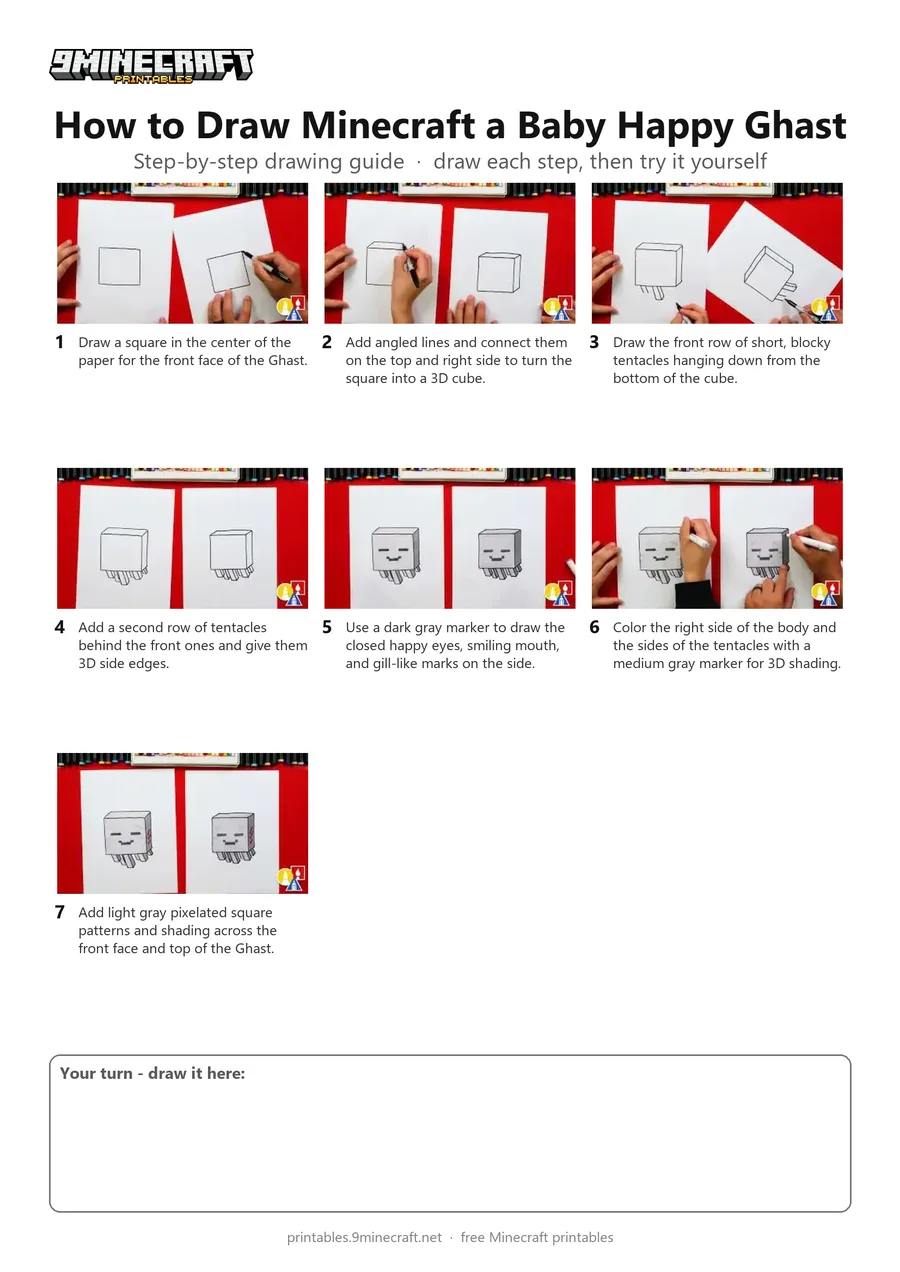
Learn how to draw a cute, smiling Baby Ghast from Minecraft in a 3D blocky style. The drawing starts with a simple 3D cube outline using a black marker and is finished with blocky shading in shades of gray. Free printable PDF for A4 and US Letter paper.
Print at 100% scale (“Actual size”). Plain printer paper works fine; crayons, colored pencils or markers all work.
 Draw a square in the center of the paper for the front face of the Ghast.
 Add angled lines and connect them on the top and right side to turn the square into a 3D cube.
 Draw the front row of short, blocky tentacles hanging down from the bottom of the cube.
 Add a second row of tentacles behind the front ones and give them 3D side edges.
 Use a dark gray marker to draw the closed happy eyes, smiling mouth, and gill-like marks on the side.
 Color the right side of the body and the sides of the tentacles with a medium gray marker for 3D shading.
 Add light gray pixelated square patterns and shading across the front face and top of the Ghast.
You need: paper, black marker, gray markers.
Video by Art for Kids Hub on YouTube.
 More How to Draw
 PDFHow to Draw Alex from Minecraft (Design 2)Cute / chibi · Ages 7-9
 PDFHow to Draw Minecraft a Chicken Jockey (Design 2)Cute / chibi · Ages 7-9
 PDFHow to Draw Minecraft a Christmas CreeperCute / chibi · Ages 7-9
 PDFHow to Draw a Minecraft Creeper (Design 3)Cute / chibi · Ages 7-9
 PDFHow to Draw Cute Minecraft AlexCute / chibi · Ages 7-9
 PDFHow to Draw a Cute Minecraft ZombieCute / chibi · Ages 7-9
 PDFHow to Draw Minecraft an Enderman (Design 4)Cute / chibi · Ages 7-9
 PDFHow to Draw Minecraft an Enderman (Design 6)Cute / chibi · Ages 7-9
 PDFHow to Draw a Minecraft GhastPixel style · Ages 7-9
 PDFHow to Draw a Minecraft Ghast (Design 3)Pixel style · Ages 7-9
 PDFHow to Draw Minecraft Steve With Diamond ArmorCute / chibi · Ages 7-9
 PDFHow to Draw a Minecraft Zombie (Design 5)Cute / chibi · Ages 7-9