
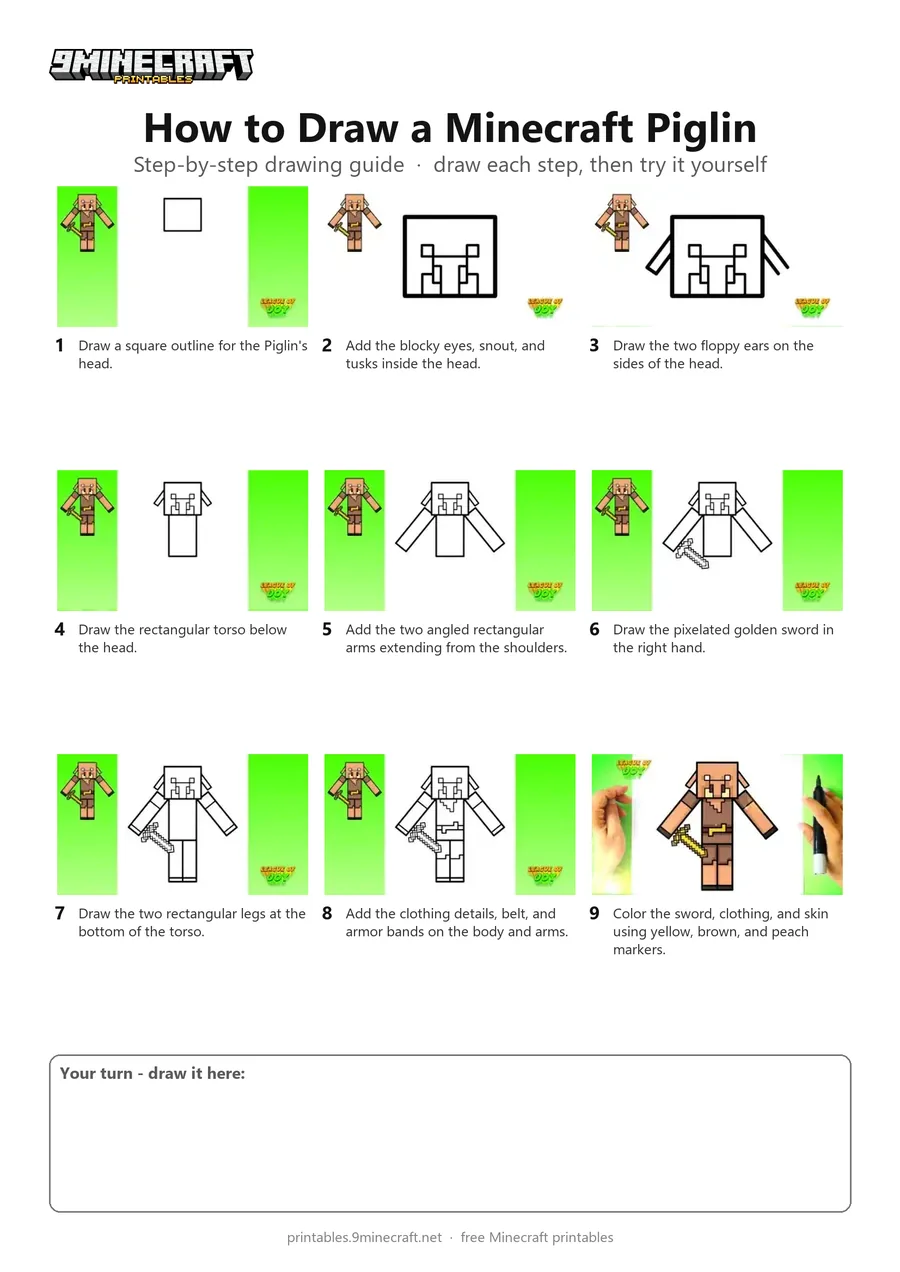
Learn how to draw a blocky Minecraft Piglin holding a golden sword step by step. The tutorial uses simple geometric lines to create the pixel-style character before coloring it with markers. Free printable PDF for A4 and US Letter paper.
Print at 100% scale (“Actual size”). Plain printer paper works fine; crayons, colored pencils or markers all work.
 Draw a square outline for the Piglin's head.
 Add the blocky eyes, snout, and tusks inside the head.
 Draw the two floppy ears on the sides of the head.
 Draw the rectangular torso below the head.
 Add the two angled rectangular arms extending from the shoulders.
 Draw the pixelated golden sword in the right hand.
 Draw the two rectangular legs at the bottom of the torso.
 Add the clothing details, belt, and armor bands on the body and arms.
 Color the sword, clothing, and skin using yellow, brown, and peach markers.
You need: marker, colored markers.
Video by League of Joy - How to Draw on YouTube.
 More How to Draw
 PDFHow to Draw Minecraft a PiglinPixel style · Ages 7-9
 PDFHow to Draw Alex from Minecraft (Design 6)Pixel style · Ages 7-9
 PDFHow to Draw a Minecraft AxolotlPixel style · Ages 7-9
 PDFHow to Draw a Minecraft Bee (Design 3)Pixel style · Ages 7-9
 PDFHow to Draw a Minecraft ChickenPixel style · Ages 7-9
 PDFHow to Draw Minecraft Diamond Armor StevePixel style · Ages 7-9
 PDFHow to Draw a Minecraft Diamond (Design 2)Pixel style · Ages 7-9
 PDFHow to Draw a Minecraft Diamond (Design 3)Pixel style · Ages 7-9
 PDFHow to Draw a Minecraft Diamond Pickaxe (Design 2)Pixel style · Ages 7-9
 PDFHow to Draw a Minecraft Diamond Sword (Design 4)Pixel style · Ages 7-9
 PDFHow to Draw a Minecraft Diamond Sword (Design 5)Pixel style · Ages 7-9
 PDFHow to Draw an Evoker from MinecraftPixel style · Ages 7-9