
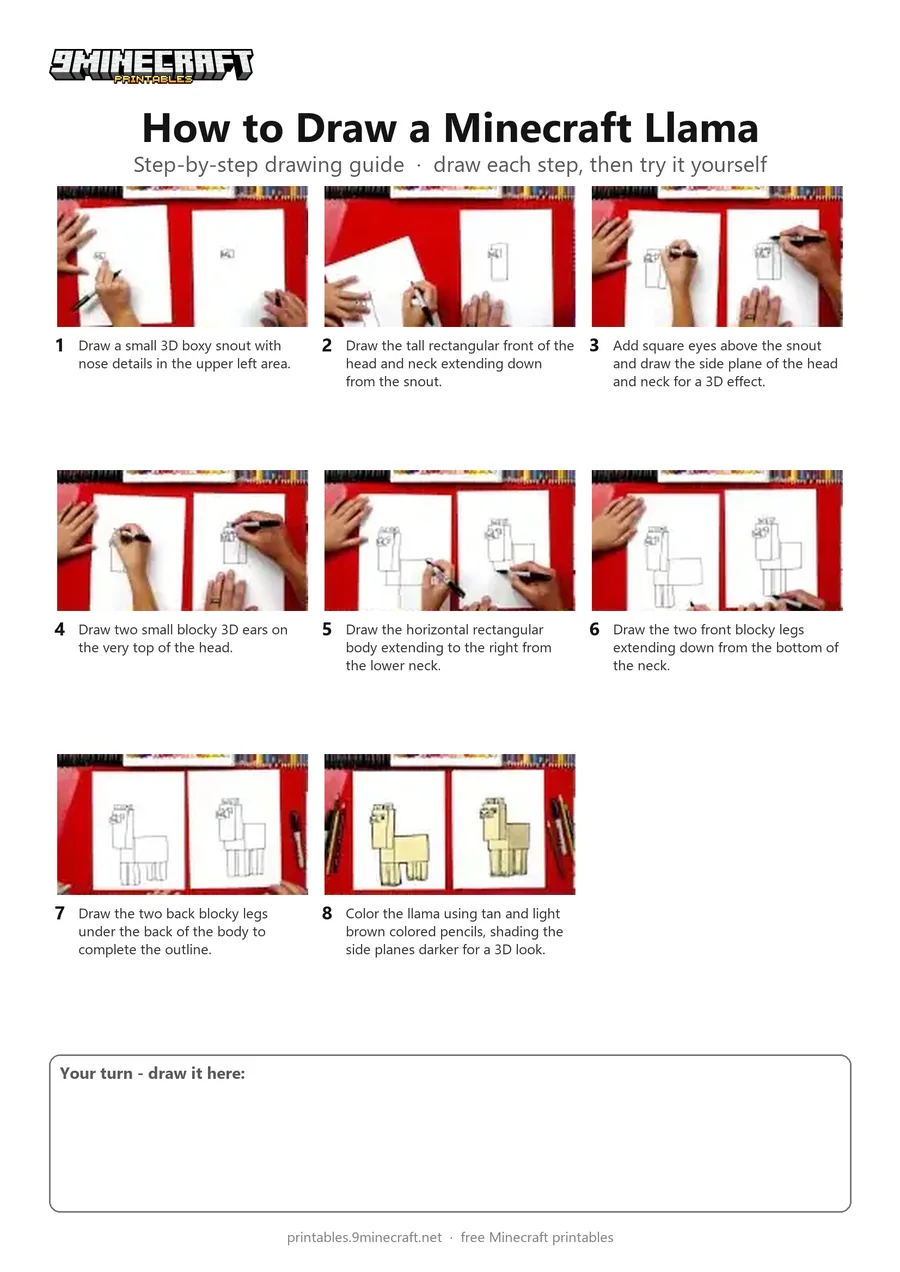
This tutorial shows how to draw a blocky 3D Minecraft Llama using simple geometric rectangles and squares. After outlining the head, tall neck, body, and four legs with a black marker, the drawing is shaded in with tan and brown colored pencils. Free printable PDF for A4 and US Letter paper.
Print at 100% scale (“Actual size”). Plain printer paper works fine; crayons, colored pencils or markers all work.
 Draw a small 3D boxy snout with nose details in the upper left area.
 Draw the tall rectangular front of the head and neck extending down from the snout.
 Add square eyes above the snout and draw the side plane of the head and neck for a 3D effect.
 Draw two small blocky 3D ears on the very top of the head.
 Draw the horizontal rectangular body extending to the right from the lower neck.
 Draw the two front blocky legs extending down from the bottom of the neck.
 Draw the two back blocky legs under the back of the body to complete the outline.
 Color the llama using tan and light brown colored pencils, shading the side planes darker for a 3D look.
You need: paper, black marker, colored pencils.
Video by Art for Kids Hub on YouTube.
 More How to Draw
 PDFHow to Draw a Minecraft AxolotlPixel style · Ages 7-9
 PDFHow to Draw a Minecraft ChickenPixel style · Ages 7-9
 PDFHow to Draw a Minecraft Frog Eating a Magma CubePixel style · Ages 7-9
 PDFHow to Draw a Minecraft Ghast (Design 2)Pixel style · Ages 7-9
 PDFHow to Draw Herobrine from Minecraft (Design 2)Pixel style · Ages 7-9
 PDFHow to Draw Minecraft an Iron Golem (Design 2)Pixel style · Ages 7-9
 PDFHow to Draw a Minecraft OcelotPixel style · Ages 7-9
 PDFHow to Draw a Minecraft Panda Eating CakePixel style · Ages 7-9
 PDFHow to Draw a Minecraft ParrotPixel style · Ages 7-9
 PDFHow to Draw a Minecraft PickaxePixel style · Ages 7-9
 PDFHow to Draw a Pig from MinecraftPixel style · Ages 7-9
 PDFHow to Draw a Minecraft SpiderPixel style · Ages 7-9