
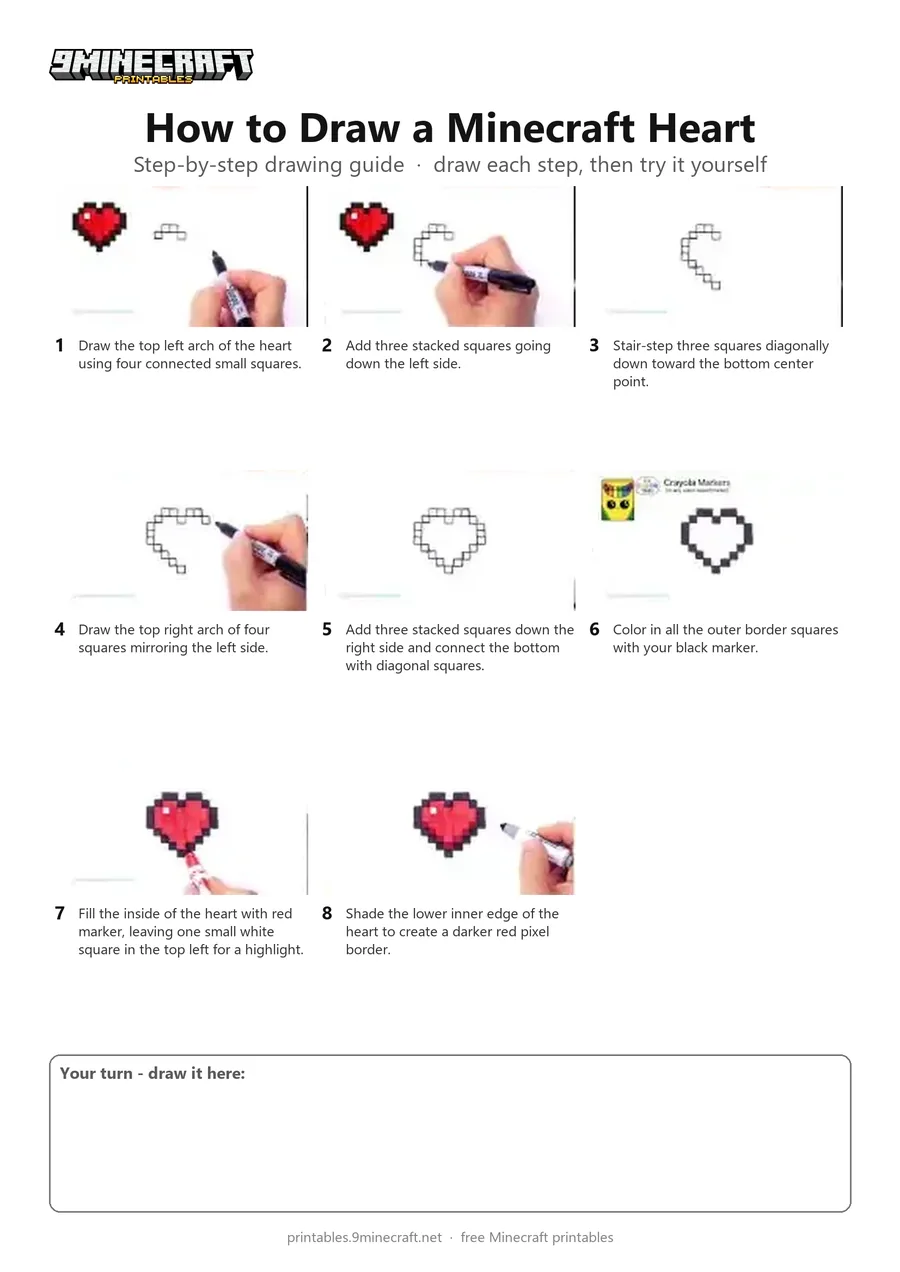
This tutorial shows how to draw and color a pixelated Minecraft heart on plain paper using markers. You build the heart outline square by square from the top arch down to the bottom point, then fill it in with black and red with dark shading. Free printable PDF for A4 and US Letter paper.
Print at 100% scale (“Actual size”). Plain printer paper works fine; crayons, colored pencils or markers all work.
 Draw the top left arch of the heart using four connected small squares.
 Add three stacked squares going down the left side.
 Stair-step three squares diagonally down toward the bottom center point.
 Draw the top right arch of four squares mirroring the left side.
 Add three stacked squares down the right side and connect the bottom with diagonal squares.
 Color in all the outer border squares with your black marker.
 Fill the inside of the heart with red marker, leaving one small white square in the top left for a highlight.
 Shade the lower inner edge of the heart to create a darker red pixel border.
You need: paper, black marker, red marker, grey marker.
Video by Draw So Cute on YouTube.
 More How to Draw
 PDFHow to Draw Minecraft an AllayPixel style · Ages 7-9
 PDFHow to Draw a Minecraft BeePixel style · Ages 7-9
 PDFHow to Draw a Minecraft CatPixel style · Ages 7-9
 PDFHow to Draw a Minecraft CowPixel style · Ages 7-9
 PDFHow to Draw a Minecraft Creeper FacePixel style · Ages 7-9
 PDFHow to Draw a Minecraft Creeper (Design 6)Pixel style · Ages 7-9
 PDFHow to Draw a Minecraft Diamond AxePixel style · Ages 7-9
 PDFHow to Draw a Minecraft DiamondPixel style · Ages 7-9
 PDFHow to Draw a Minecraft Diamond PickaxePixel style · Ages 7-9
 PDFHow to Draw a Minecraft Diamond SwordPixel style · Ages 7-9
 PDFHow to Draw a Minecraft Diamond Sword (Design 2)Pixel style · Ages 7-9
 PDFHow to Draw a Minecraft Diamond Sword (Design 3)Pixel style · Ages 7-9