
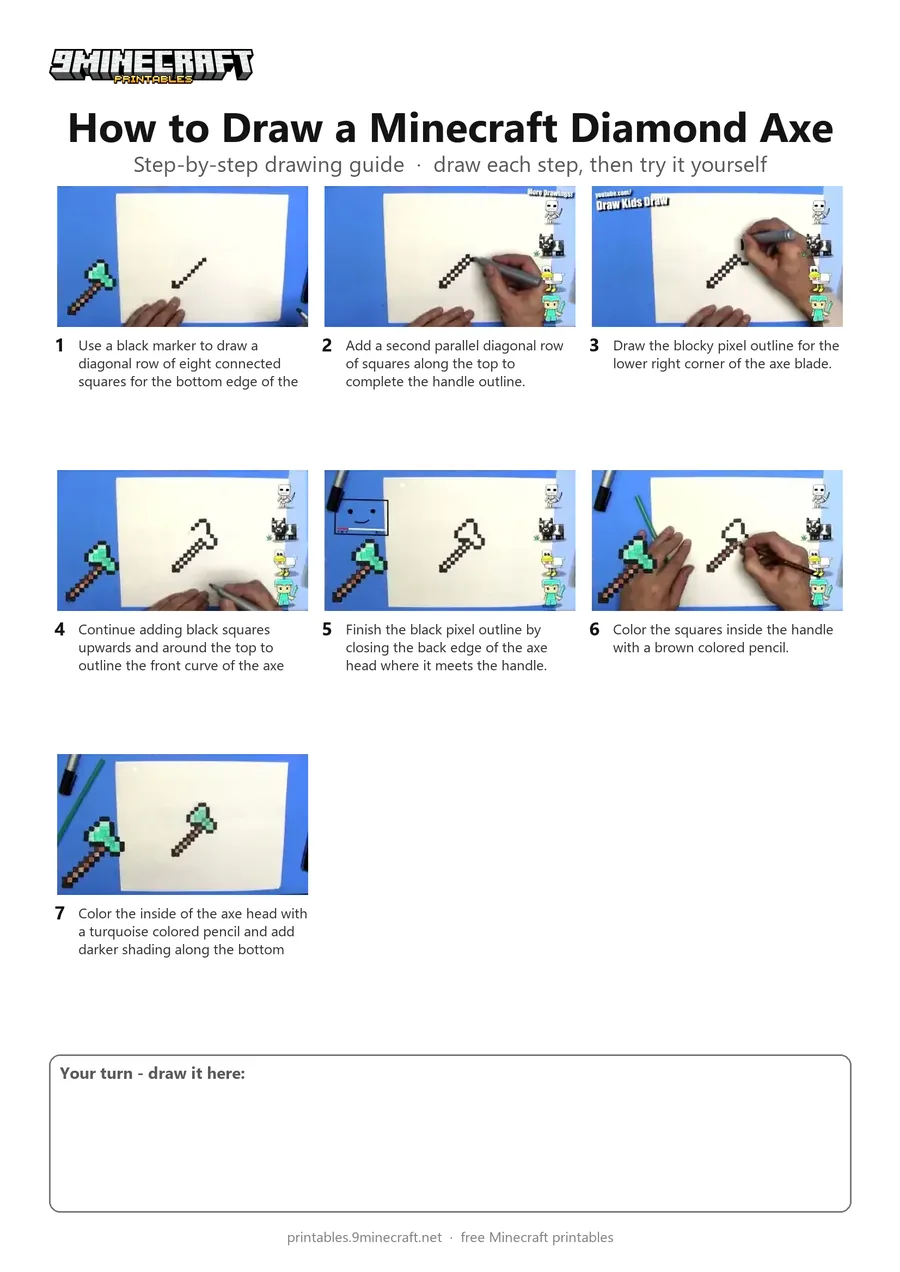
A pixel-art drawing of a Minecraft diamond axe with a brown wooden handle and a turquoise blade. The tutorial uses a simple dot-and-square technique on blank paper with a black marker and colored pencils. Free printable PDF for A4 and US Letter paper.
Print at 100% scale (“Actual size”). Plain printer paper works fine; crayons, colored pencils or markers all work.
 Use a black marker to draw a diagonal row of eight connected squares for the bottom edge of the handle.
 Add a second parallel diagonal row of squares along the top to complete the handle outline.
 Draw the blocky pixel outline for the lower right corner of the axe blade.
 Continue adding black squares upwards and around the top to outline the front curve of the axe head.
 Finish the black pixel outline by closing the back edge of the axe head where it meets the handle.
 Color the squares inside the handle with a brown colored pencil.
 Color the inside of the axe head with a turquoise colored pencil and add darker shading along the bottom edge.
You need: paper, black marker, colored pencils.
Video by DKD Art Studio on YouTube.
 More How to Draw
 PDFHow to Draw Minecraft an AllayPixel style · Ages 7-9
 PDFHow to Draw a Minecraft BeePixel style · Ages 7-9
 PDFHow to Draw a Minecraft CatPixel style · Ages 7-9
 PDFHow to Draw a Minecraft CowPixel style · Ages 7-9
 PDFHow to Draw a Minecraft Creeper FacePixel style · Ages 7-9
 PDFHow to Draw a Minecraft Creeper (Design 6)Pixel style · Ages 7-9
 PDFHow to Draw a Minecraft DiamondPixel style · Ages 7-9
 PDFHow to Draw a Minecraft Diamond PickaxePixel style · Ages 7-9
 PDFHow to Draw a Minecraft Diamond SwordPixel style · Ages 7-9
 PDFHow to Draw a Minecraft Diamond Sword (Design 2)Pixel style · Ages 7-9
 PDFHow to Draw a Minecraft Diamond Sword (Design 3)Pixel style · Ages 7-9
 PDFHow to Draw a Minecraft Diamond Sword (Design 6)Pixel style · Ages 7-9