
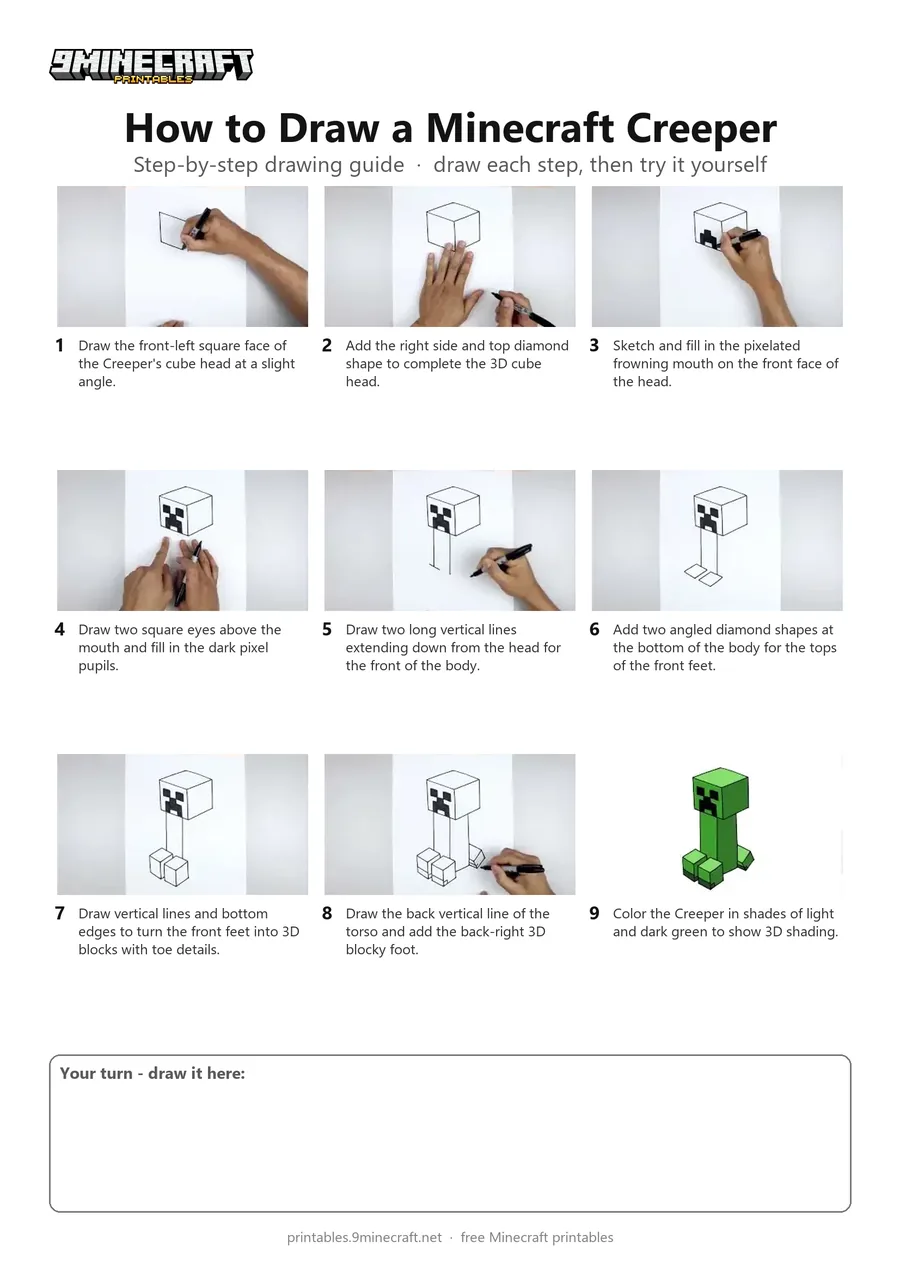
Learn how to draw a 3D blocky Minecraft Creeper step by step using a black marker. The tutorial shows how to construct the cube head, facial features, torso, and four blocky feet before coloring it green. Free printable PDF for A4 and US Letter paper.
Print at 100% scale (“Actual size”). Plain printer paper works fine; crayons, colored pencils or markers all work.
 Draw the front-left square face of the Creeper's cube head at a slight angle.
 Add the right side and top diamond shape to complete the 3D cube head.
 Sketch and fill in the pixelated frowning mouth on the front face of the head.
 Draw two square eyes above the mouth and fill in the dark pixel pupils.
 Draw two long vertical lines extending down from the head for the front of the body.
 Add two angled diamond shapes at the bottom of the body for the tops of the front feet.
 Draw vertical lines and bottom edges to turn the front feet into 3D blocks with toe details.
 Draw the back vertical line of the torso and add the back-right 3D blocky foot.
 Color the Creeper in shades of light and dark green to show 3D shading.
You need: paper, black marker, green markers.
Video by Cartooning Club How to Draw on YouTube.
 More How to Draw
 PDFHow to Draw a Minecraft Creeper FacePixel style · Ages 7-9
 PDFHow to Draw Minecraft an AllayPixel style · Ages 7-9
 PDFHow to Draw a Minecraft BeePixel style · Ages 7-9
 PDFHow to Draw a Minecraft CatPixel style · Ages 7-9
 PDFHow to Draw Minecraft a Christmas CreeperCute / chibi · Ages 7-9
 PDFHow to Draw a Minecraft CowPixel style · Ages 7-9
 PDFHow to Draw a Minecraft Creeper (Design 2)Simple · Ages 7-9
 PDFHow to Draw a Minecraft Creeper (Design 3)Cute / chibi · Ages 7-9
 PDFHow to Draw a Minecraft Creeper (Design 4)Cartoon · Ages 7-9
 PDFHow to Draw a Minecraft DiamondPixel style · Ages 7-9
 PDFHow to Draw a Minecraft Diamond PickaxePixel style · Ages 7-9
 PDFHow to Draw a Minecraft Diamond SwordPixel style · Ages 7-9