
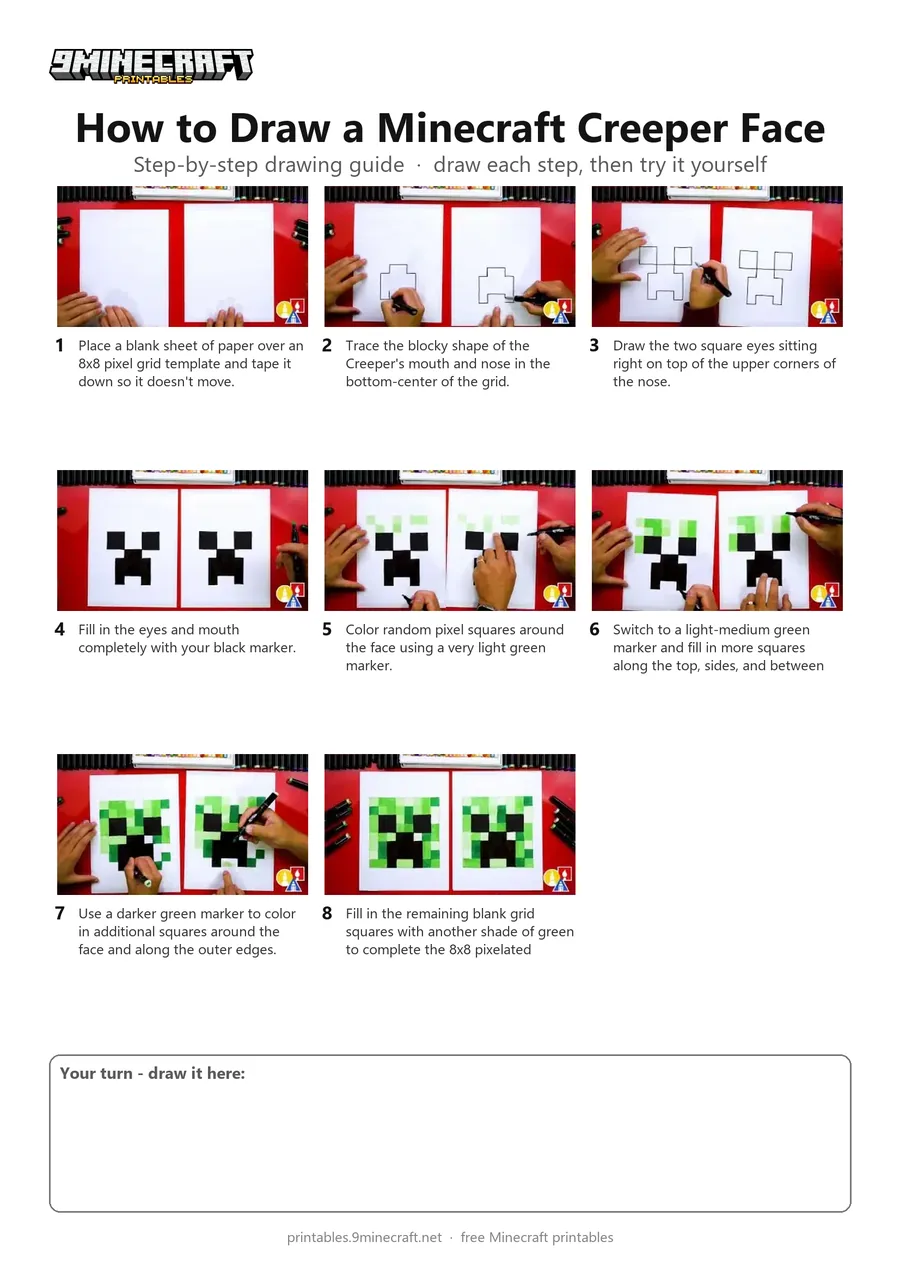
This tutorial teaches you how to draw a pixel-accurate Minecraft Creeper face using a grid placed underneath your paper. You'll outline the iconic face and fill in the surrounding pixel squares with different shades of green markers. Free printable PDF for A4 and US Letter paper.
Print at 100% scale (“Actual size”). Plain printer paper works fine; crayons, colored pencils or markers all work.
 Place a blank sheet of paper over an 8x8 pixel grid template and tape it down so it doesn't move.
 Trace the blocky shape of the Creeper's mouth and nose in the bottom-center of the grid.
 Draw the two square eyes sitting right on top of the upper corners of the nose.
 Fill in the eyes and mouth completely with your black marker.
 Color random pixel squares around the face using a very light green marker.
 Switch to a light-medium green marker and fill in more squares along the top, sides, and between the eyes.
 Use a darker green marker to color in additional squares around the face and along the outer edges.
 Fill in the remaining blank grid squares with another shade of green to complete the 8x8 pixelated Creeper face.
You need: paper, grid template, black marker, green markers.
Video by Art for Kids Hub on YouTube.
 More How to Draw
 PDFHow to Draw Minecraft an AllayPixel style · Ages 7-9
 PDFHow to Draw a Minecraft BeePixel style · Ages 7-9
 PDFHow to Draw a Minecraft CatPixel style · Ages 7-9
 PDFHow to Draw Minecraft a Christmas CreeperCute / chibi · Ages 7-9
 PDFHow to Draw a Minecraft Creeper (Design 2)Simple · Ages 7-9
 PDFHow to Draw a Minecraft Creeper (Design 3)Cute / chibi · Ages 7-9
 PDFHow to Draw a Minecraft Creeper (Design 4)Cartoon · Ages 7-9
 PDFHow to Draw a Minecraft Diamond PickaxePixel style · Ages 7-9
 PDFHow to Draw a Minecraft Diamond SwordPixel style · Ages 7-9
 PDFHow to Draw a Minecraft FoxPixel style · Ages 7-9
 PDFHow to Draw a Minecraft GhastPixel style · Ages 7-9
 PDFHow to Draw Minecraft an Iron GolemPixel style · Ages 7-9