
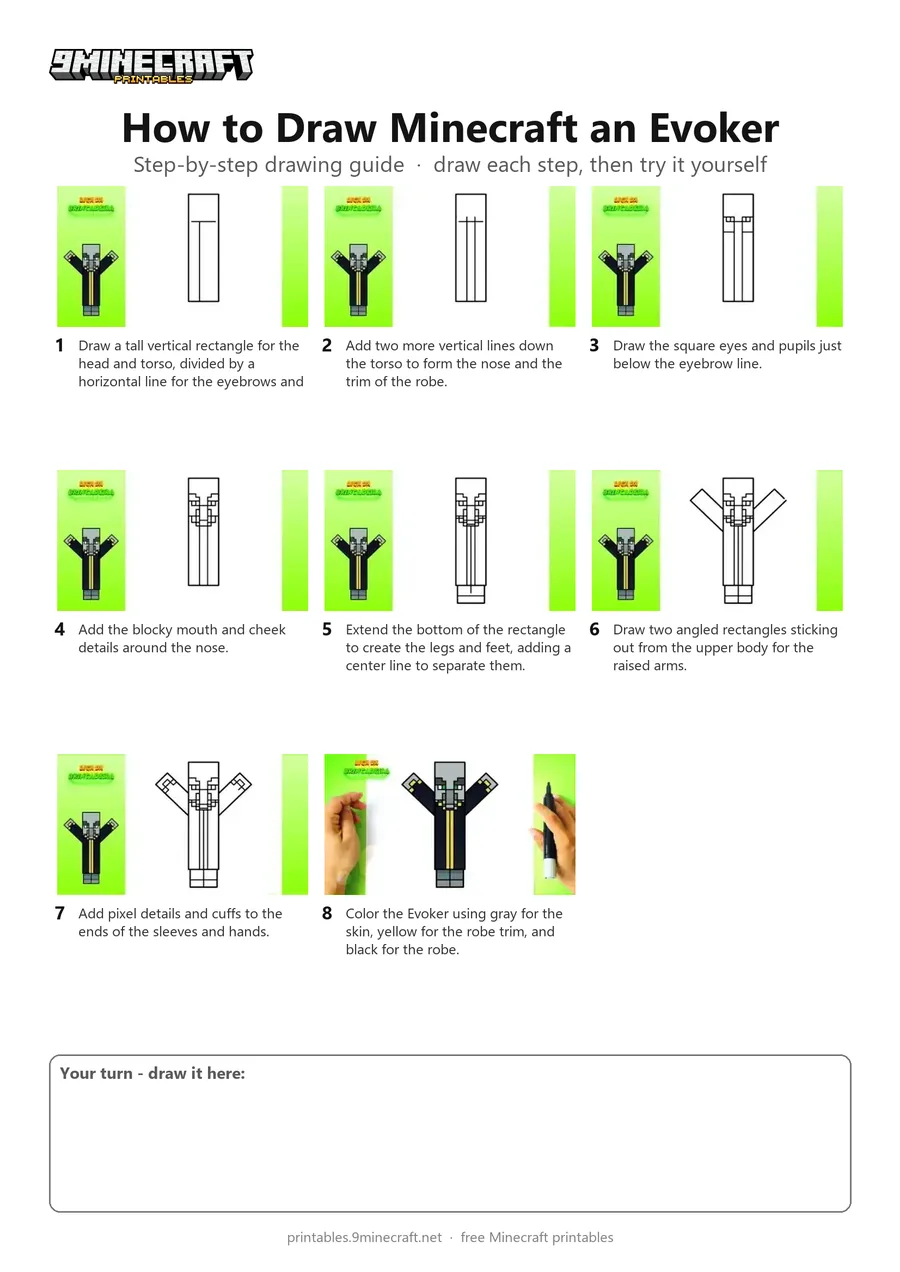
This tutorial shows how to draw a boxy Minecraft Evoker raising its arms to cast a spell. It breaks down the character into simple straight lines and geometric shapes before adding color. Free printable PDF for A4 and US Letter paper.
Print at 100% scale (“Actual size”). Plain printer paper works fine; crayons, colored pencils or markers all work.
 Draw a tall vertical rectangle for the head and torso, divided by a horizontal line for the eyebrows and a vertical center line.
 Add two more vertical lines down the torso to form the nose and the trim of the robe.
 Draw the square eyes and pupils just below the eyebrow line.
 Add the blocky mouth and cheek details around the nose.
 Extend the bottom of the rectangle to create the legs and feet, adding a center line to separate them.
 Draw two angled rectangles sticking out from the upper body for the raised arms.
 Add pixel details and cuffs to the ends of the sleeves and hands.
 Color the Evoker using gray for the skin, yellow for the robe trim, and black for the robe.
You need: pen, markers.
Video by Liga da Brincadeira - Como Desenhar on YouTube.
 More How to Draw
 PDFHow to Draw an Evoker from MinecraftPixel style · Ages 7-9
 PDFHow to Draw Alex from Minecraft (Design 6)Pixel style · Ages 7-9
 PDFHow to Draw a Minecraft AxolotlPixel style · Ages 7-9
 PDFHow to Draw a Minecraft Bee (Design 3)Pixel style · Ages 7-9
 PDFHow to Draw a Minecraft ChickenPixel style · Ages 7-9
 PDFHow to Draw Minecraft Diamond Armor StevePixel style · Ages 7-9
 PDFHow to Draw a Minecraft Diamond (Design 2)Pixel style · Ages 7-9
 PDFHow to Draw a Minecraft Diamond (Design 3)Pixel style · Ages 7-9
 PDFHow to Draw a Minecraft Diamond Pickaxe (Design 2)Pixel style · Ages 7-9
 PDFHow to Draw a Minecraft Diamond Sword (Design 4)Pixel style · Ages 7-9
 PDFHow to Draw a Minecraft Diamond Sword (Design 5)Pixel style · Ages 7-9
 PDFHow to Draw a Minecraft Frog Eating a Magma CubePixel style · Ages 7-9