
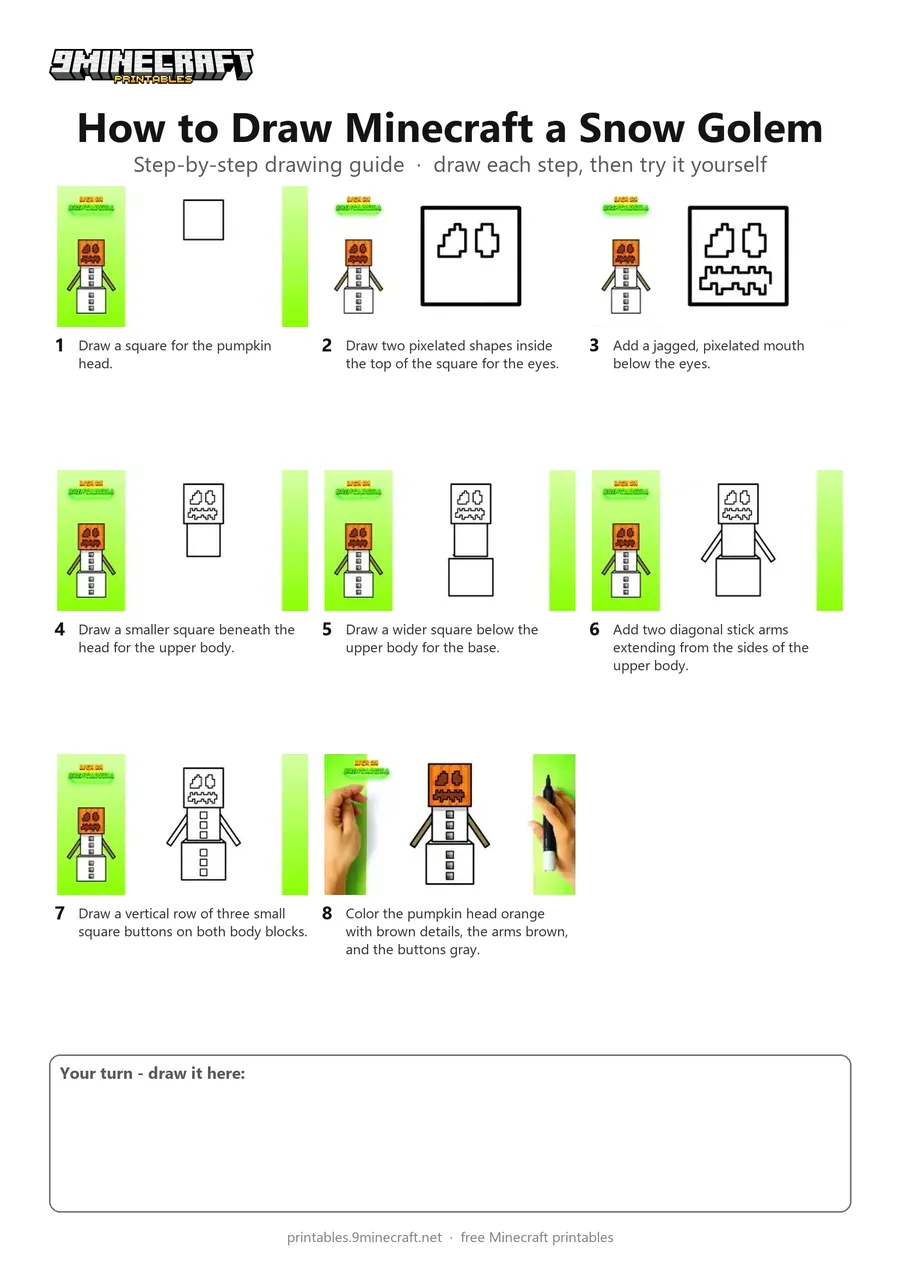
Learn how to draw a blocky Minecraft Snow Golem with its carved pumpkin head and stick arms. The tutorial breaks down the pixel-style face and stacked body blocks into simple, easy-to-follow line steps before coloring. Free printable PDF for A4 and US Letter paper.
Print at 100% scale (“Actual size”). Plain printer paper works fine; crayons, colored pencils or markers all work.
 Draw a square for the pumpkin head.
 Draw two pixelated shapes inside the top of the square for the eyes.
 Add a jagged, pixelated mouth below the eyes.
 Draw a smaller square beneath the head for the upper body.
 Draw a wider square below the upper body for the base.
 Add two diagonal stick arms extending from the sides of the upper body.
 Draw a vertical row of three small square buttons on both body blocks.
 Color the pumpkin head orange with brown details, the arms brown, and the buttons gray.
You need: black pen, colored markers.
Video by Liga da Brincadeira - Como Desenhar on YouTube.
 More How to Draw
 PDFHow to Draw Minecraft a Snow GolemPixel style · Ages 7-9
 PDFHow to Draw a Minecraft Snow GolemPixel style · Ages 7-9
 PDFHow to Draw Minecraft an AllayPixel style · Ages 7-9
 PDFHow to Draw a Minecraft BeePixel style · Ages 7-9
 PDFHow to Draw a Minecraft CatPixel style · Ages 7-9
 PDFHow to Draw a Minecraft Chicken (Design 2)Pixel style · Ages 7-9
 PDFHow to Draw a Minecraft CowPixel style · Ages 7-9
 PDFHow to Draw a Minecraft Creeper FacePixel style · Ages 7-9
 PDFHow to Draw a Minecraft Creeper (Design 6)Pixel style · Ages 7-9
 PDFHow to Draw a Minecraft Diamond AxePixel style · Ages 7-9
 PDFHow to Draw a Minecraft Diamond Axe (Design 2)Pixel style · Ages 7-9
 PDFHow to Draw a Minecraft Diamond Axe (Design 3)Pixel style · Ages 7-9