
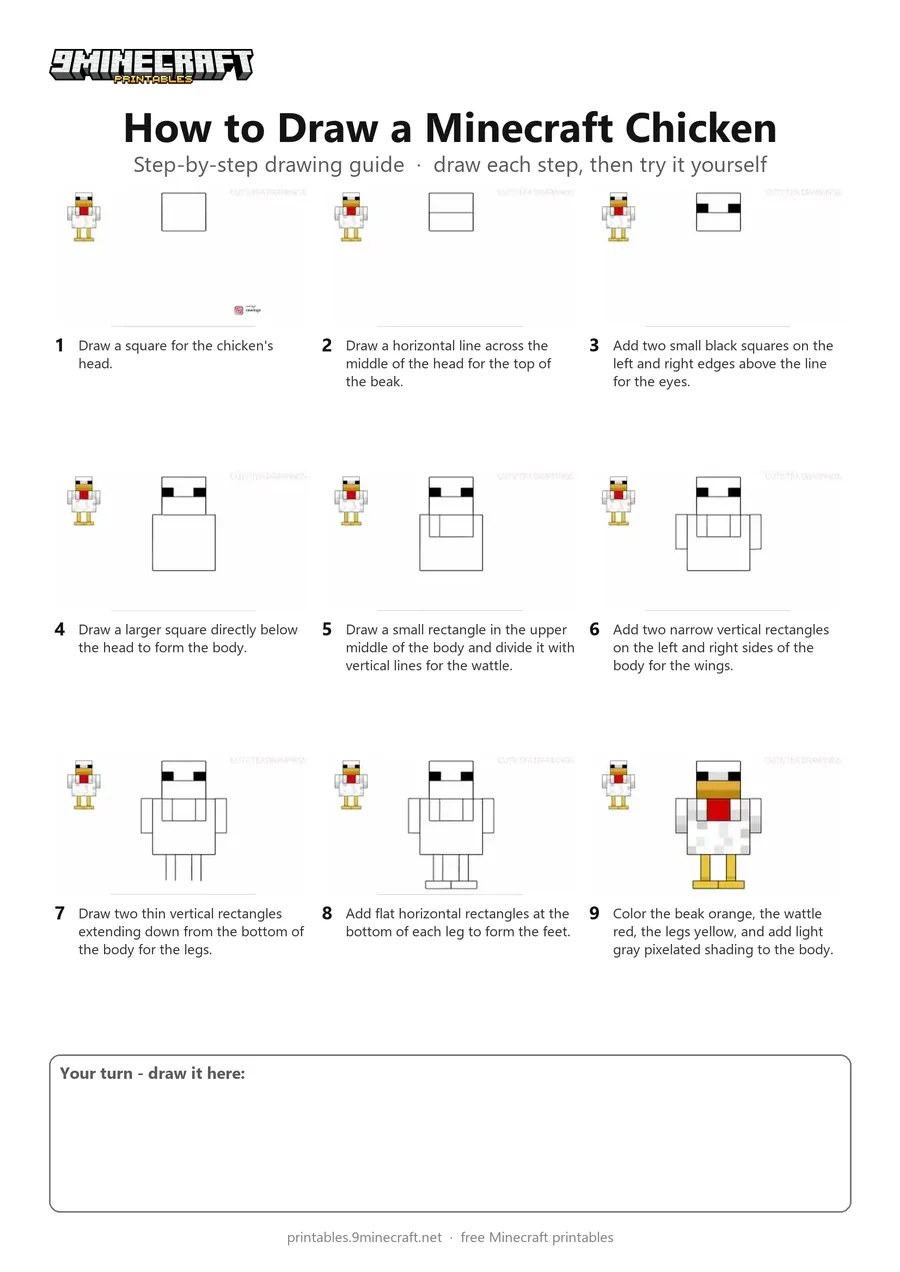
This tutorial shows how to draw a front-facing Minecraft Chicken using simple geometric rectangles and squares. After completing the blocky outline, the chicken is colored with yellow, orange, red, and light gray shading for its blocky feathers. Free printable PDF for A4 and US Letter paper.
Print at 100% scale (“Actual size”). Plain printer paper works fine; crayons, colored pencils or markers all work.
 Draw a square for the chicken's head.
 Draw a horizontal line across the middle of the head for the top of the beak.
 Add two small black squares on the left and right edges above the line for the eyes.
 Draw a larger square directly below the head to form the body.
 Draw a small rectangle in the upper middle of the body and divide it with vertical lines for the wattle.
 Add two narrow vertical rectangles on the left and right sides of the body for the wings.
 Draw two thin vertical rectangles extending down from the bottom of the body for the legs.
 Add flat horizontal rectangles at the bottom of each leg to form the feet.
 Color the beak orange, the wattle red, the legs yellow, and add light gray pixelated shading to the body.
You need: pencil, marker, colored pencils.
Video by Cute Tea Drawings on YouTube.
 More How to Draw
 PDFHow to Draw Minecraft an AllayPixel style · Ages 7-9
 PDFHow to Draw a Minecraft BeePixel style · Ages 7-9
 PDFHow to Draw a Minecraft CatPixel style · Ages 7-9
 PDFHow to Draw a Minecraft ChickenPixel style · Ages 7-9
 PDFHow to Draw Minecraft a Chicken Jockey (Design 2)Cute / chibi · Ages 7-9
 PDFHow to Draw a Minecraft CowPixel style · Ages 7-9
 PDFHow to Draw a Minecraft Creeper FacePixel style · Ages 7-9
 PDFHow to Draw a Minecraft Creeper (Design 6)Pixel style · Ages 7-9
 PDFHow to Draw a Minecraft Diamond AxePixel style · Ages 7-9
 PDFHow to Draw a Minecraft Diamond Axe (Design 2)Pixel style · Ages 7-9
 PDFHow to Draw a Minecraft Diamond Axe (Design 3)Pixel style · Ages 7-9
 PDFHow to Draw a Minecraft DiamondPixel style · Ages 7-9