
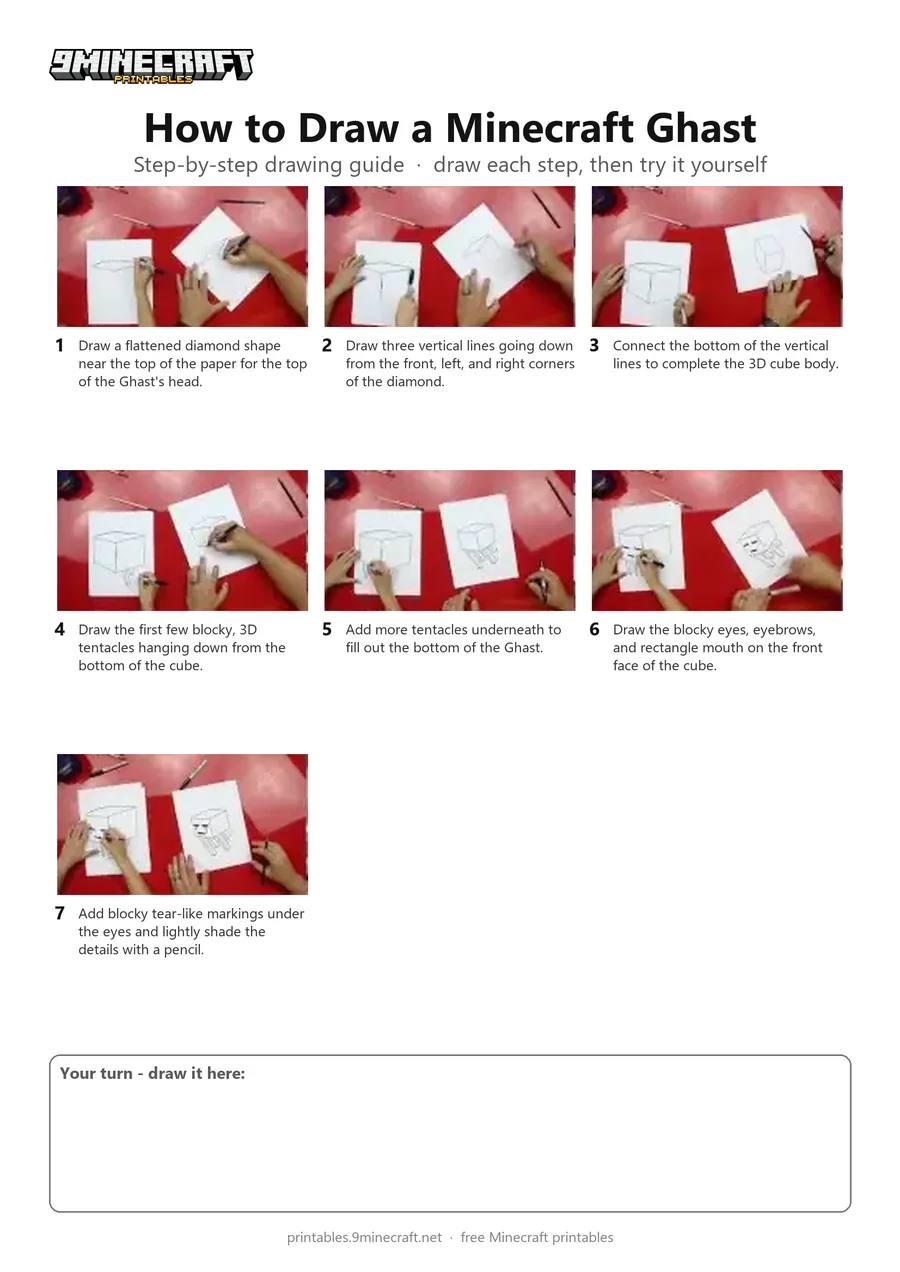
A step-by-step tutorial showing how to draw a 3D cubic Minecraft Ghast floating in the air. The drawing starts with the top diamond shape, extends down into a cube, adds tentacles underneath, and finishes with pixel facial features and light shading. Free printable PDF for A4 and US Letter paper.
Print at 100% scale (“Actual size”). Plain printer paper works fine; crayons, colored pencils or markers all work.
 Draw a flattened diamond shape near the top of the paper for the top of the Ghast's head.
 Draw three vertical lines going down from the front, left, and right corners of the diamond.
 Connect the bottom of the vertical lines to complete the 3D cube body.
 Draw the first few blocky, 3D tentacles hanging down from the bottom of the cube.
 Add more tentacles underneath to fill out the bottom of the Ghast.
 Draw the blocky eyes, eyebrows, and rectangle mouth on the front face of the cube.
 Add blocky tear-like markings under the eyes and lightly shade the details with a pencil.
You need: paper, marker, colored pencils.
Video by Art for Kids Hub on YouTube.
 More How to Draw
 PDFHow to Draw Minecraft an AllayPixel style · Ages 7-9
 PDFHow to Draw Minecraft a Baby Happy GhastCute / chibi · Ages 7-9
 PDFHow to Draw a Minecraft BeePixel style · Ages 7-9
 PDFHow to Draw a Minecraft CatPixel style · Ages 7-9
 PDFHow to Draw a Minecraft Creeper FacePixel style · Ages 7-9
 PDFHow to Draw a Minecraft Diamond PickaxePixel style · Ages 7-9
 PDFHow to Draw a Minecraft Diamond SwordPixel style · Ages 7-9
 PDFHow to Draw a Minecraft FoxPixel style · Ages 7-9
 PDFHow to Draw a Minecraft Ghast (Design 2)Pixel style · Ages 7-9
 PDFHow to Draw Minecraft an Iron GolemPixel style · Ages 7-9
 PDFHow to Draw a Minecraft Pickaxe (Design 2)Pixel style · Ages 7-9
 PDFHow to Draw Minecraft a Pixel HeartPixel style · Ages 7-9