
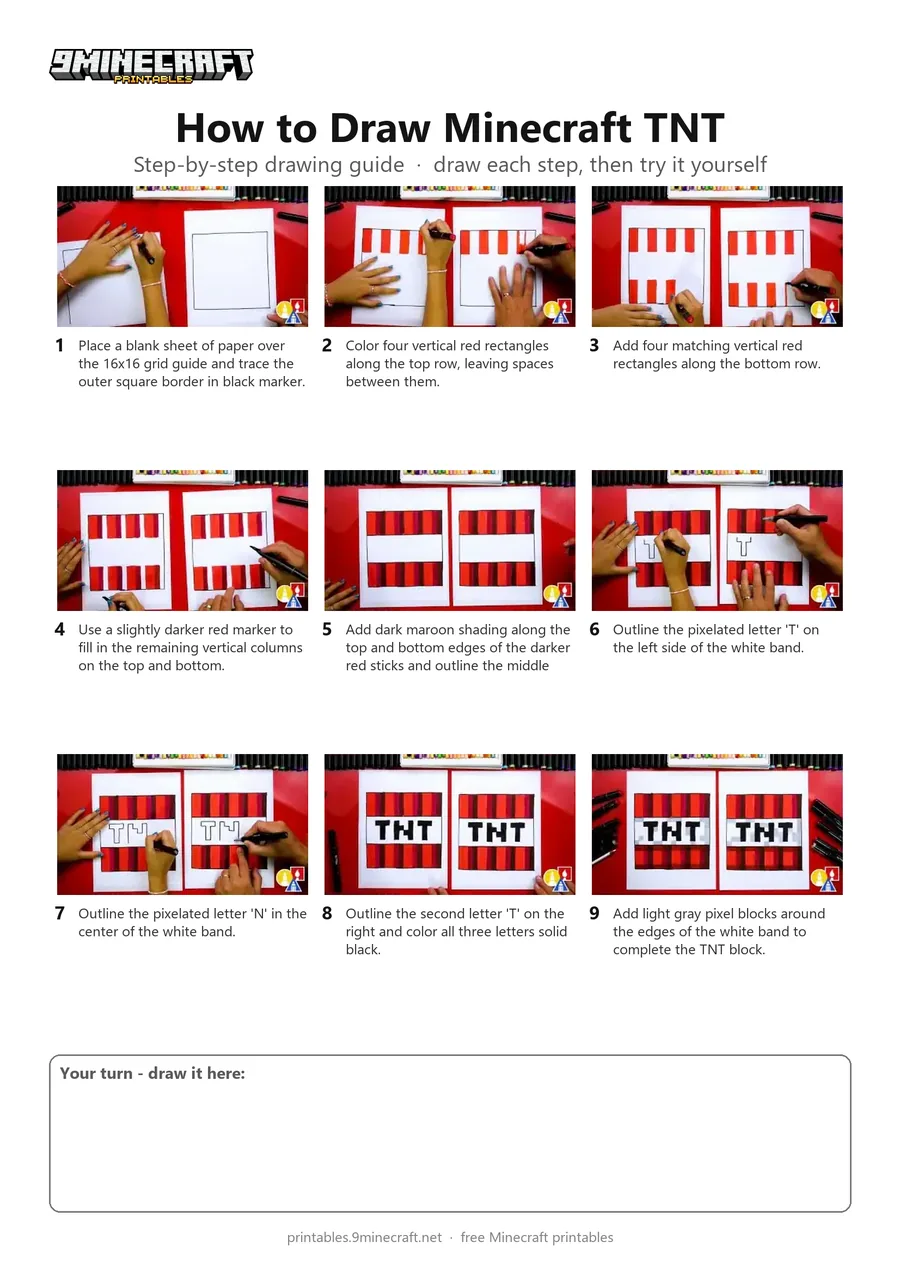
Learn how to draw a pixel-art style Minecraft TNT block using markers and a grid guide underneath your paper. The finished drawing features alternating shades of red dynamite sticks wrapped in a white label with bold black pixelated letters. Free printable PDF for A4 and US Letter paper.
Print at 100% scale (“Actual size”). Plain printer paper works fine; crayons, colored pencils or markers all work.
 Place a blank sheet of paper over the 16x16 grid guide and trace the outer square border in black marker.
 Color four vertical red rectangles along the top row, leaving spaces between them.
 Add four matching vertical red rectangles along the bottom row.
 Use a slightly darker red marker to fill in the remaining vertical columns on the top and bottom.
 Add dark maroon shading along the top and bottom edges of the darker red sticks and outline the middle white band.
 Outline the pixelated letter 'T' on the left side of the white band.
 Outline the pixelated letter 'N' in the center of the white band.
 Outline the second letter 'T' on the right and color all three letters solid black.
 Add light gray pixel blocks around the edges of the white band to complete the TNT block.
You need: paper, grid paper, markers.
Video by Art for Kids Hub on YouTube.
 More How to Draw
 PDFHow to Draw Minecraft an AllayPixel style · Ages 7-9
 PDFHow to Draw a Minecraft BeePixel style · Ages 7-9
 PDFHow to Draw a Minecraft CatPixel style · Ages 7-9
 PDFHow to Draw a Minecraft Creeper FacePixel style · Ages 7-9
 PDFHow to Draw a Minecraft Diamond PickaxePixel style · Ages 7-9
 PDFHow to Draw a Minecraft Diamond SwordPixel style · Ages 7-9
 PDFHow to Draw a Minecraft FoxPixel style · Ages 7-9
 PDFHow to Draw a Minecraft GhastPixel style · Ages 7-9
 PDFHow to Draw Minecraft an Iron GolemPixel style · Ages 7-9
 PDFHow to Draw a Minecraft Pickaxe (Design 2)Pixel style · Ages 7-9
 PDFHow to Draw Minecraft a Pixel HeartPixel style · Ages 7-9
 PDFHow to Draw a Minecraft SkeletonPixel style · Ages 7-9