
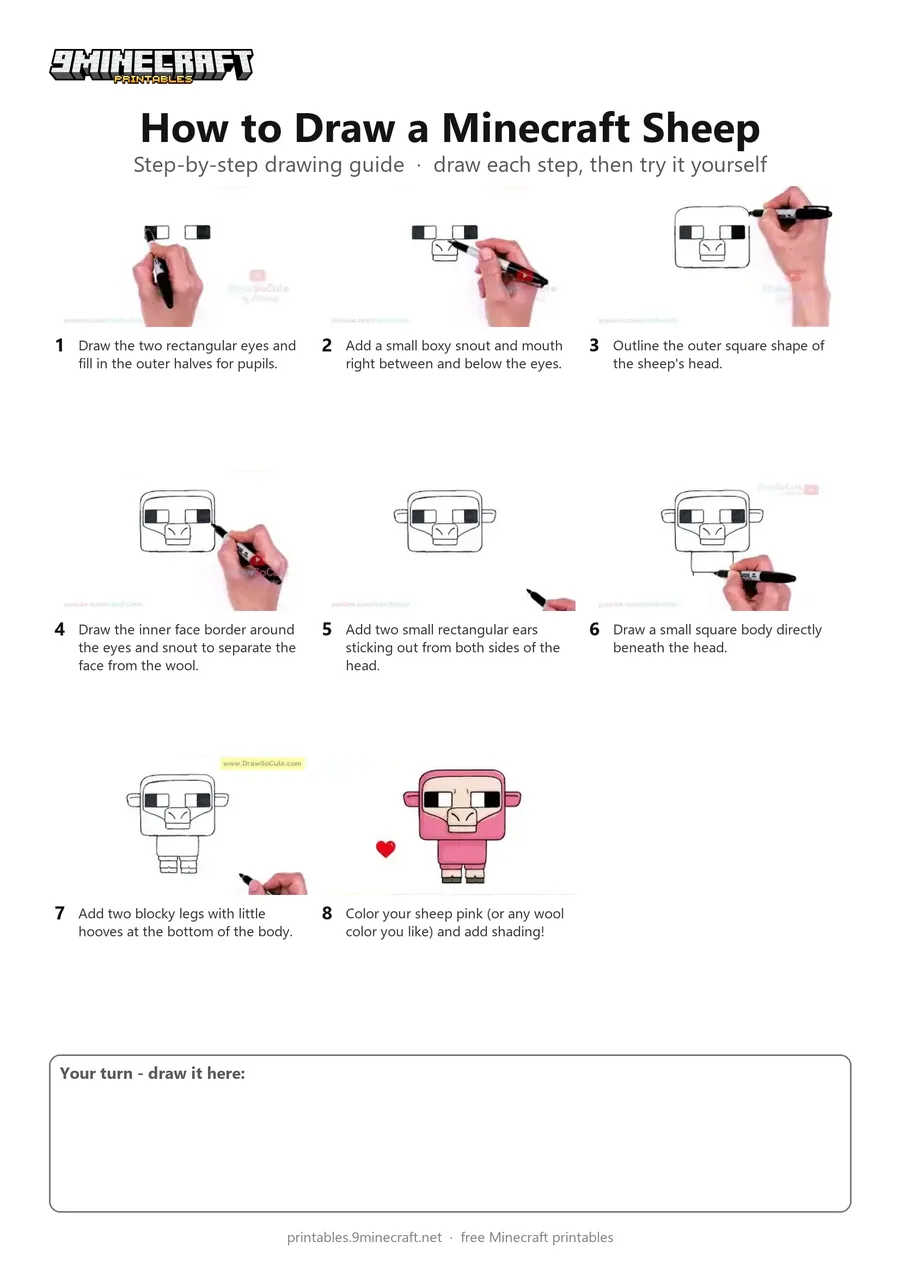
Learn how to draw a cute pink Minecraft sheep in a blocky chibi style. This tutorial breaks down the blocky head, eyes, snout, wool outline, and little body into simple, easy-to-follow steps. Free printable PDF for A4 and US Letter paper.
Print at 100% scale (“Actual size”). Plain printer paper works fine; crayons, colored pencils or markers all work.
 Draw the two rectangular eyes and fill in the outer halves for pupils.
 Add a small boxy snout and mouth right between and below the eyes.
 Outline the outer square shape of the sheep's head.
 Draw the inner face border around the eyes and snout to separate the face from the wool.
 Add two small rectangular ears sticking out from both sides of the head.
 Draw a small square body directly beneath the head.
 Add two blocky legs with little hooves at the bottom of the body.
 Color your sheep pink (or any wool color you like) and add shading!
You need: marker, paper, colored pencils.
Video by Draw So Cute on YouTube.
 More How to Draw
 PDFHow to Draw Alex from Minecraft (Design 2)Cute / chibi · Ages 7-9
 PDFHow to Draw Minecraft AlexCute / chibi · Ages 7-9
 PDFHow to Draw Minecraft a Baby Happy GhastCute / chibi · Ages 7-9
 PDFHow to Draw Minecraft a Chicken Jockey (Design 2)Cute / chibi · Ages 7-9
 PDFHow to Draw Minecraft a Christmas CreeperCute / chibi · Ages 7-9
 PDFHow to Draw a Minecraft Creeper (Design 3)Cute / chibi · Ages 7-9
 PDFHow to Draw Cute Minecraft AlexCute / chibi · Ages 7-9
 PDFHow to Draw a Cute Minecraft CowCute / chibi · Ages 7-9
 PDFHow to Draw a Cute Minecraft ZombieCute / chibi · Ages 7-9
 PDFHow to Draw Minecraft an Enderman (Design 4)Cute / chibi · Ages 7-9
 PDFHow to Draw Minecraft an Enderman (Design 6)Cute / chibi · Ages 7-9
 PDFHow to Draw Minecraft Steve With Diamond ArmorCute / chibi · Ages 7-9