
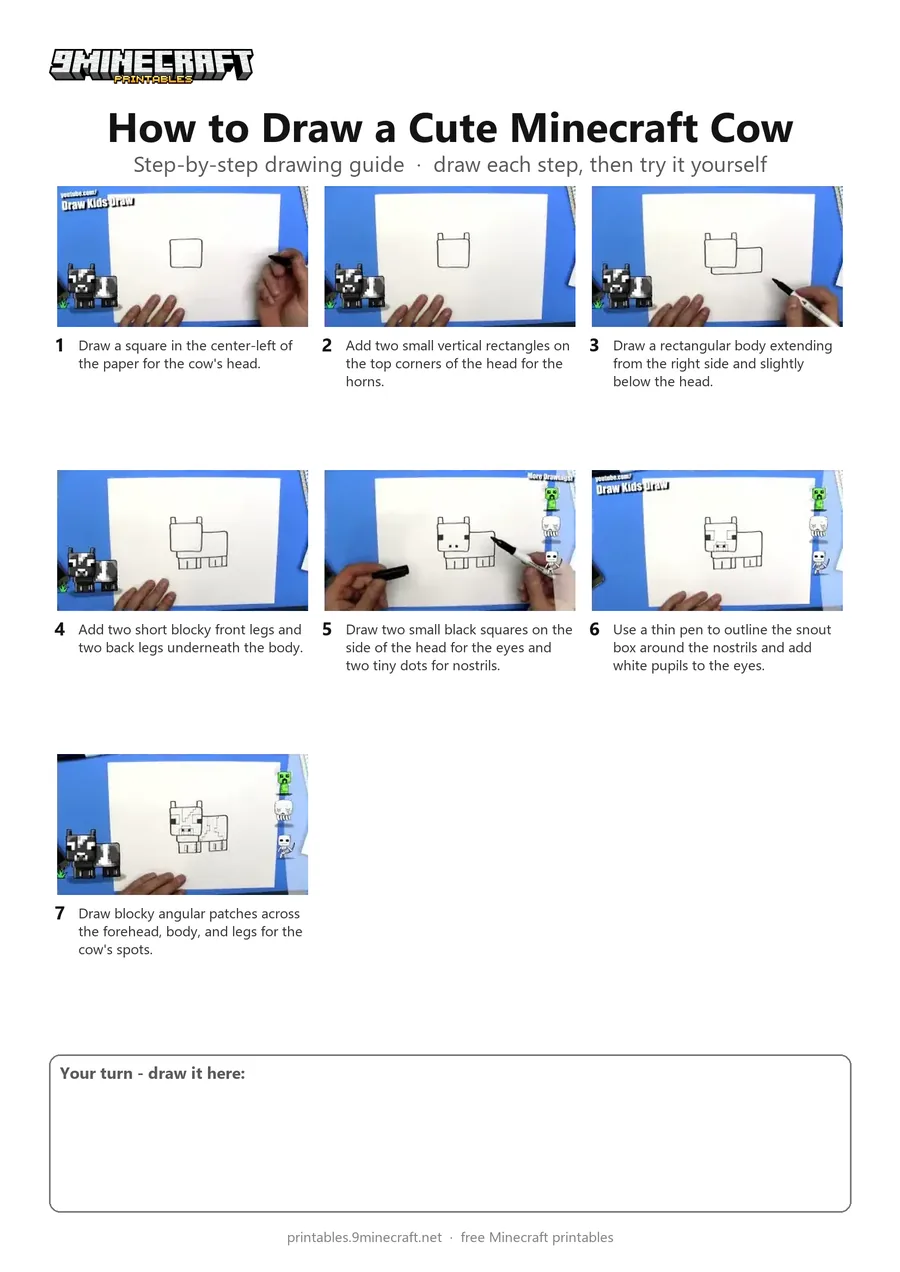
This tutorial shows how to draw a cute blocky Minecraft cow in a simple side profile view. You start by outlining the square head, body, and legs with a thick marker, then add facial features and cow spots with a fine pen. Free printable PDF for A4 and US Letter paper.
Print at 100% scale (“Actual size”). Plain printer paper works fine; crayons, colored pencils or markers all work.
 Draw a square in the center-left of the paper for the cow's head.
 Add two small vertical rectangles on the top corners of the head for the horns.
 Draw a rectangular body extending from the right side and slightly below the head.
 Add two short blocky front legs and two back legs underneath the body.
 Draw two small black squares on the side of the head for the eyes and two tiny dots for nostrils.
 Use a thin pen to outline the snout box around the nostrils and add white pupils to the eyes.
 Draw blocky angular patches across the forehead, body, and legs for the cow's spots.
You need: paper, black marker, fine liner.
Video by DKD Art Studio on YouTube.
 More How to Draw
 PDFHow to Draw Alex from Minecraft (Design 2)Cute / chibi · Ages 7-9
 PDFHow to Draw Minecraft AlexCute / chibi · Ages 7-9
 PDFHow to Draw Minecraft a Baby Happy GhastCute / chibi · Ages 7-9
 PDFHow to Draw Minecraft a Chicken Jockey (Design 2)Cute / chibi · Ages 7-9
 PDFHow to Draw Minecraft a Christmas CreeperCute / chibi · Ages 7-9
 PDFHow to Draw a Minecraft CowPixel style · Ages 7-9
 PDFHow to Draw a Minecraft Creeper (Design 3)Cute / chibi · Ages 7-9
 PDFHow to Draw Cute Minecraft AlexCute / chibi · Ages 7-9
 PDFHow to Draw a Cute Minecraft ZombieCute / chibi · Ages 7-9
 PDFHow to Draw Minecraft an Enderman (Design 4)Cute / chibi · Ages 7-9
 PDFHow to Draw Minecraft an Enderman (Design 6)Cute / chibi · Ages 7-9
 PDFHow to Draw a Minecraft Sheep (Design 2)Cute / chibi · Ages 7-9