
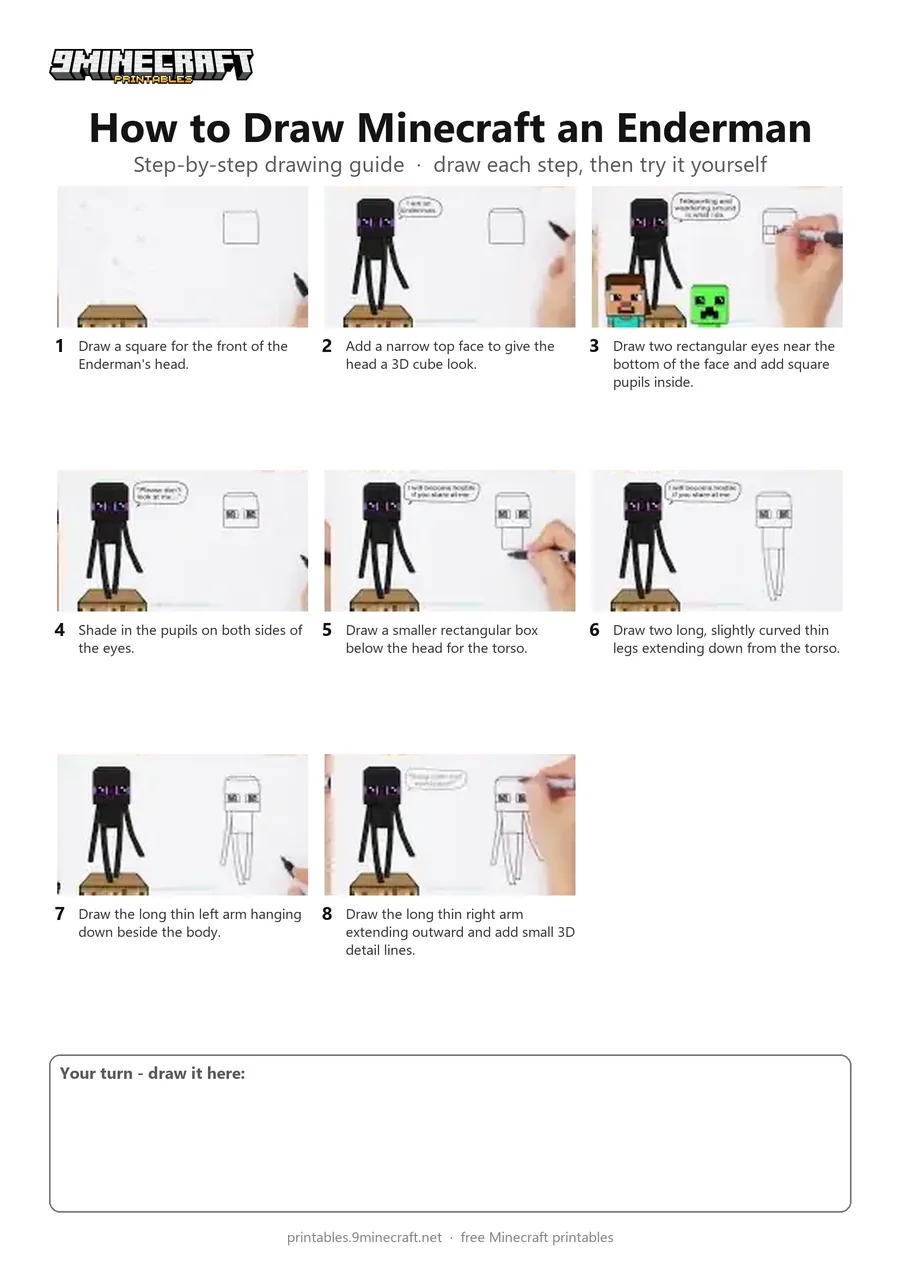
Learn how to draw a cute 3D-style Minecraft Enderman standing tall with long limbs. Follow the simple line-by-line marker instructions starting from the blocky head down to the legs and arms. Free printable PDF for A4 and US Letter paper.
Print at 100% scale (“Actual size”). Plain printer paper works fine; crayons, colored pencils or markers all work.
 Draw a square for the front of the Enderman's head.
 Add a narrow top face to give the head a 3D cube look.
 Draw two rectangular eyes near the bottom of the face and add square pupils inside.
 Shade in the pupils on both sides of the eyes.
 Draw a smaller rectangular box below the head for the torso.
 Draw two long, slightly curved thin legs extending down from the torso.
 Draw the long thin left arm hanging down beside the body.
 Draw the long thin right arm extending outward and add small 3D detail lines.
You need: marker, paper.
Video by Draw So Cute on YouTube.
 More How to Draw
 PDFHow to Draw Alex from Minecraft (Design 2)Cute / chibi · Ages 7-9
 PDFHow to Draw Minecraft a Baby Happy GhastCute / chibi · Ages 7-9
 PDFHow to Draw Minecraft a Christmas CreeperCute / chibi · Ages 7-9
 PDFHow to Draw a Minecraft Creeper (Design 3)Cute / chibi · Ages 7-9
 PDFHow to Draw a Cute Minecraft ZombieCute / chibi · Ages 7-9
 PDFHow to Draw Minecraft an EndermanSimple · Ages 7-9
 PDFHow to Draw Minecraft Steve With Diamond ArmorCute / chibi · Ages 7-9
 PDFHow to Draw Alex from MinecraftSimple · Ages 7-9
 PDFHow to Draw Minecraft an AllayPixel style · Ages 7-9
 PDFHow to Draw a Minecraft BeePixel style · Ages 7-9
 PDFHow to Draw a Minecraft CatPixel style · Ages 7-9
 PDFHow to Draw Minecraft Chibi DanTDMCute / chibi · Ages 7-9