
Learn how to draw a cute, blocky Minecraft Bee with wings, stripes, and six little legs. This simple step-by-step marker tutorial breaks the character down into easy rectangular shapes perfect for young beginners. Free printable PDF for A4 and US Letter paper.
Print at 100% scale (“Actual size”). Plain printer paper works fine; crayons, colored pencils or markers all work.
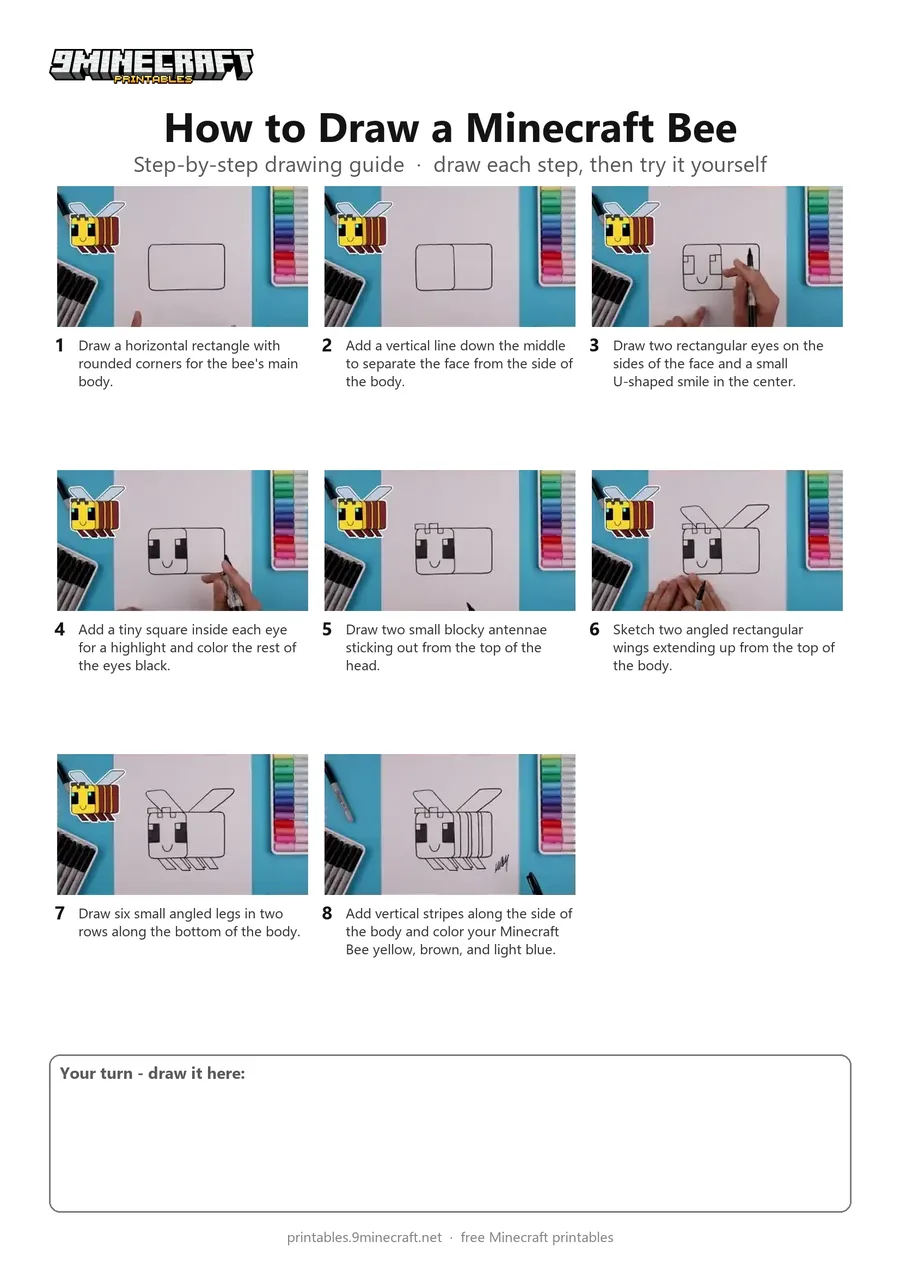
 Draw a horizontal rectangle with rounded corners for the bee's main body.
 Add a vertical line down the middle to separate the face from the side of the body.
 Draw two rectangular eyes on the sides of the face and a small U-shaped smile in the center.
 Add a tiny square inside each eye for a highlight and color the rest of the eyes black.
 Draw two small blocky antennae sticking out from the top of the head.
 Sketch two angled rectangular wings extending up from the top of the body.
 Draw six small angled legs in two rows along the bottom of the body.
 Add vertical stripes along the side of the body and color your Minecraft Bee yellow, brown, and light blue.
You need: paper, black marker, colored markers.
Video by Cartooning Club Junior on YouTube.
 More How to Draw
 PDFHow to Draw Alex from Minecraft (Design 2)Cute / chibi · Ages 7-9
 PDFHow to Draw Minecraft a Baby Happy GhastCute / chibi · Ages 7-9
 PDFHow to Draw a Minecraft BeePixel style · Ages 7-9
 PDFHow to Draw Minecraft a Christmas CreeperCute / chibi · Ages 7-9
 PDFHow to Draw a Minecraft Creeper (Design 3)Cute / chibi · Ages 7-9
 PDFHow to Draw Cute Minecraft AlexCute / chibi · Ages 7-9
 PDFHow to Draw a Cute Minecraft ZombieCute / chibi · Ages 7-9
 PDFHow to Draw Minecraft an Enderman (Design 2)Simple · Ages 4-6
 PDFHow to Draw Minecraft an Enderman (Design 4)Cute / chibi · Ages 7-9
 PDFHow to Draw Minecraft Steve With Diamond ArmorCute / chibi · Ages 7-9
 PDFHow to Draw Alex from MinecraftSimple · Ages 7-9
 PDFHow to Draw Minecraft an AllayPixel style · Ages 7-9