
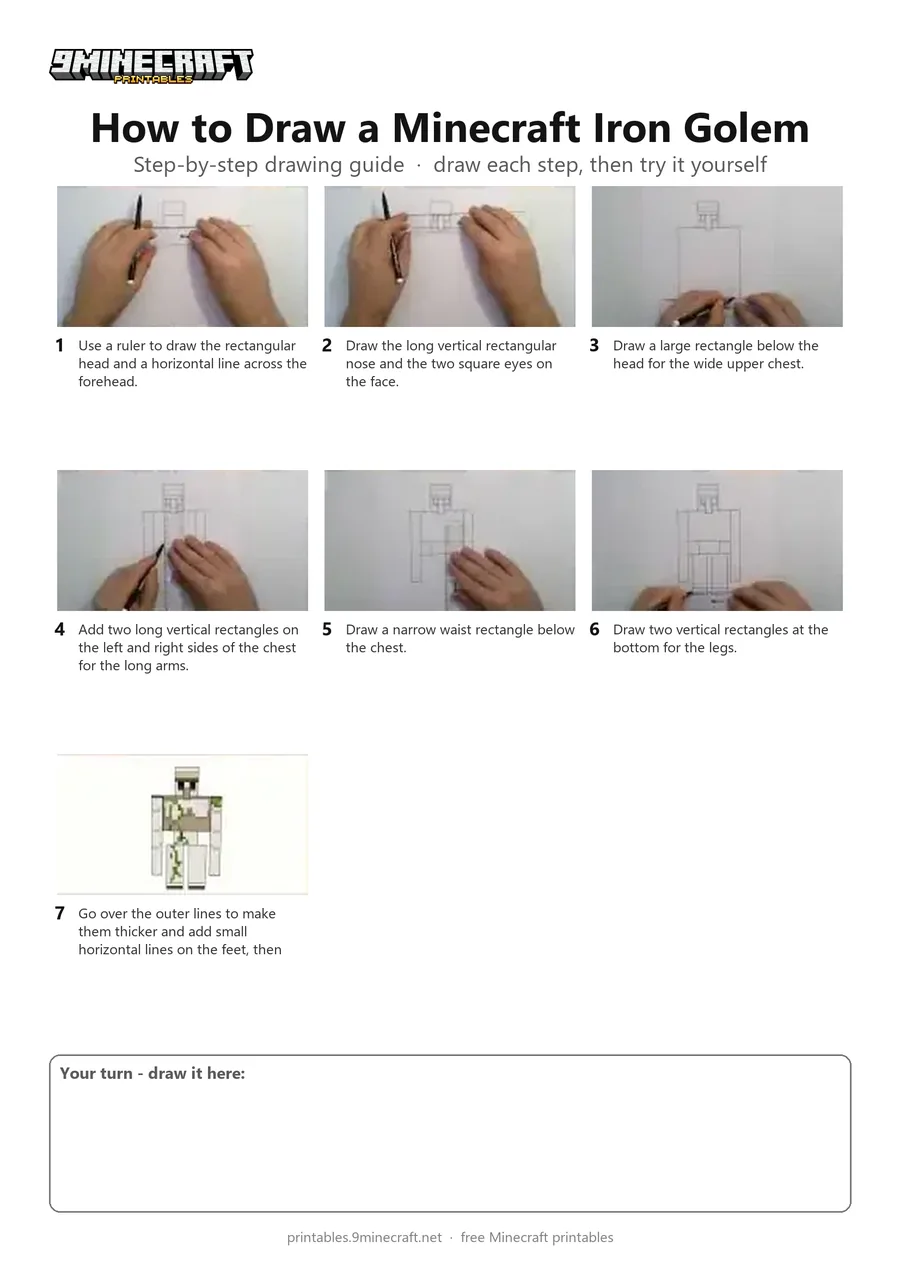
Learn how to draw a front-facing Minecraft Iron Golem using simple geometric rectangles with a ruler. The tutorial finishes by showing a colored version with vine details for reference. Free printable PDF for A4 and US Letter paper.
Print at 100% scale (“Actual size”). Plain printer paper works fine; crayons, colored pencils or markers all work.
 Use a ruler to draw the rectangular head and a horizontal line across the forehead.
 Draw the long vertical rectangular nose and the two square eyes on the face.
 Draw a large rectangle below the head for the wide upper chest.
 Add two long vertical rectangles on the left and right sides of the chest for the long arms.
 Draw a narrow waist rectangle below the chest.
 Draw two vertical rectangles at the bottom for the legs.
 Go over the outer lines to make them thicker and add small horizontal lines on the feet, then color your Iron Golem.
You need: pen, ruler.
Video by Pablo ART on YouTube.
 More How to Draw
 PDFHow to Draw a Minecraft Iron GolemSimple · Ages 7-9
 PDFHow to Draw Minecraft an Iron Golem from Letter TSimple · Ages 7-9
 PDFHow to Draw an Iron Golem from MinecraftSimple · Ages 7-9
 PDFHow to Draw an Iron Golem from Minecraft (Design 2)Simple · Ages 7-9
 PDFHow to Draw Alex from MinecraftSimple · Ages 7-9
 PDFHow to Draw Alex from Minecraft (Design 3)Simple · Ages 7-9
 PDFHow to Draw Alex from Minecraft (Design 4)Simple · Ages 7-9
 PDFHow to Draw a Minecraft ChestSimple · Ages 7-9
 PDFHow to Draw a Minecraft Copper GolemSimple · Ages 7-9
 PDFHow to Draw a Minecraft Creeper (Design 2)Simple · Ages 7-9
 PDFHow to Draw Minecraft a CreeperSimple · Ages 7-9
 PDFHow to Draw Minecraft an Enderman Holding a Grass BlockSimple · Ages 7-9