
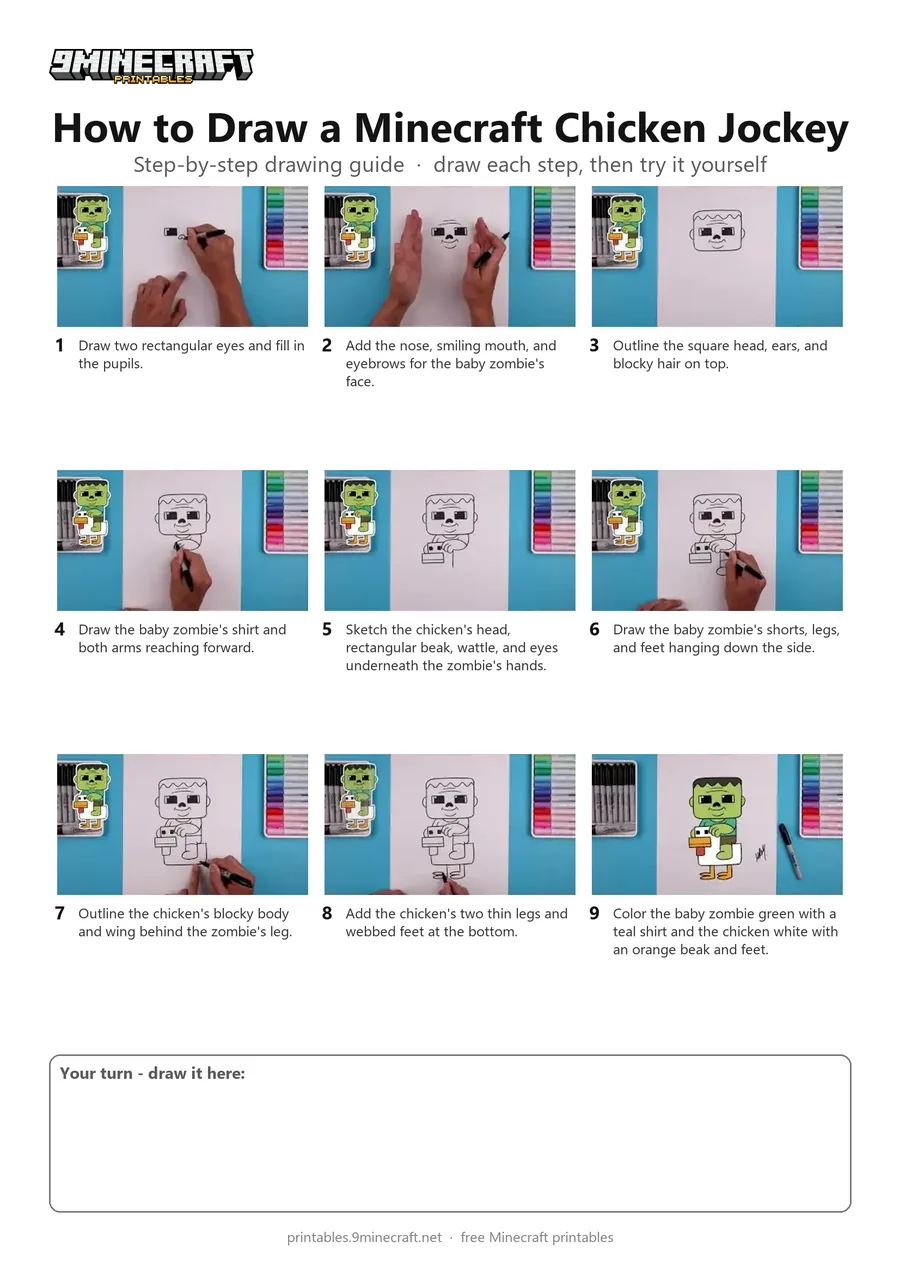
Learn how to draw a cute cartoon Minecraft Chicken Jockey featuring a baby zombie riding a chicken. This step-by-step tutorial uses a black marker for bold outlines and finishes with bright colored markers. Free printable PDF for A4 and US Letter paper.
Print at 100% scale (“Actual size”). Plain printer paper works fine; crayons, colored pencils or markers all work.
 Draw two rectangular eyes and fill in the pupils.
 Add the nose, smiling mouth, and eyebrows for the baby zombie's face.
 Outline the square head, ears, and blocky hair on top.
 Draw the baby zombie's shirt and both arms reaching forward.
 Sketch the chicken's head, rectangular beak, wattle, and eyes underneath the zombie's hands.
 Draw the baby zombie's shorts, legs, and feet hanging down the side.
 Outline the chicken's blocky body and wing behind the zombie's leg.
 Add the chicken's two thin legs and webbed feet at the bottom.
 Color the baby zombie green with a teal shirt and the chicken white with an orange beak and feet.
You need: paper, black marker, colored markers.
Video by Cartooning Club Junior on YouTube.
 More How to Draw
 PDFHow to Draw Minecraft a Chicken Jockey (Design 3)Cute / chibi · Ages 7-9
 PDFHow to Draw Minecraft a Chicken JockeyCartoon · Ages 7-9
 PDFHow to Draw Minecraft a Chicken Jockey (Design 2)Cute / chibi · Ages 7-9
 PDFHow to Draw Minecraft a Chicken Jockey (Design 4)Detailed · Ages 10+
 PDFHow to Draw Minecraft Chibi DanTDMCute / chibi · Ages 7-9
 PDFHow to Draw a Minecraft ChickenPixel style · Ages 7-9
 PDFHow to Draw a Minecraft Creeper Surprise FoldCute / chibi · Ages 7-9
 PDFHow to Draw a 3D Minecraft CreeperDetailed · Ages 7-9
 PDFHow to Draw Alex from Minecraft (Design 2)Cute / chibi · Ages 7-9
 PDFHow to Draw Minecraft AlexCute / chibi · Ages 7-9
 PDFHow to Draw a Minecraft AxolotlPixel style · Ages 7-9
 PDFHow to Draw Minecraft a Baby Happy GhastCute / chibi · Ages 7-9