
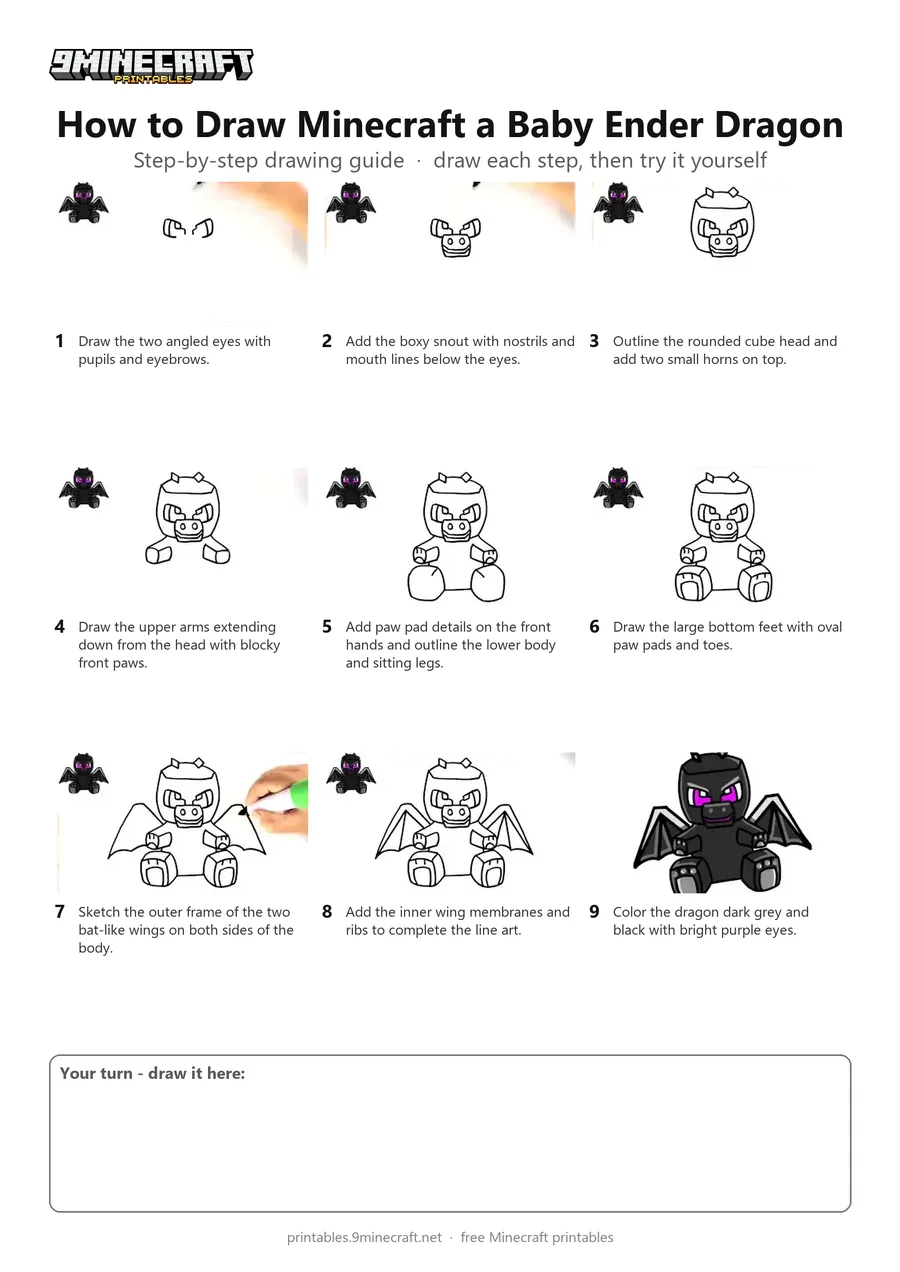
Learn how to draw a cute sitting baby Ender Dragon from Minecraft step by step. The tutorial starts with the eyes and snout, builds out the head and paws, and finishes with the bat-like wings and dark coloring. Free printable PDF for A4 and US Letter paper.
Print at 100% scale (“Actual size”). Plain printer paper works fine; crayons, colored pencils or markers all work.
 Draw the two angled eyes with pupils and eyebrows.
 Add the boxy snout with nostrils and mouth lines below the eyes.
 Outline the rounded cube head and add two small horns on top.
 Draw the upper arms extending down from the head with blocky front paws.
 Add paw pad details on the front hands and outline the lower body and sitting legs.
 Draw the large bottom feet with oval paw pads and toes.
 Sketch the outer frame of the two bat-like wings on both sides of the body.
 Add the inner wing membranes and ribs to complete the line art.
 Color the dragon dark grey and black with bright purple eyes.
You need: marker.
Video by HappyART on YouTube.
 More How to Draw
 PDFHow to Draw Minecraft Chibi DanTDMCute / chibi · Ages 7-9
 PDFHow to Draw a Minecraft Chicken JockeyCute / chibi · Ages 7-9
 PDFHow to Draw Minecraft a Chicken Jockey (Design 3)Cute / chibi · Ages 7-9
 PDFHow to Draw a Minecraft Creeper Surprise FoldCute / chibi · Ages 7-9
 PDFHow to Draw Minecraft an Ender Dragon Surprise FoldCartoon · Ages 7-9
 PDFHow to Draw Minecraft an Ender Dragon Surprise Fold (Design 2)Cartoon · Ages 7-9
 PDFHow to Draw a 3D Minecraft CreeperDetailed · Ages 7-9
 PDFHow to Draw Alex from Minecraft (Design 2)Cute / chibi · Ages 7-9
 PDFHow to Draw Alex from Minecraft (Design 5)Simple · Ages 7-9
 PDFHow to Draw Alex from Minecraft (Design 6)Pixel style · Ages 7-9
 PDFHow to Draw Minecraft AlexCute / chibi · Ages 7-9
 PDFHow to Draw a Minecraft AxolotlPixel style · Ages 7-9