
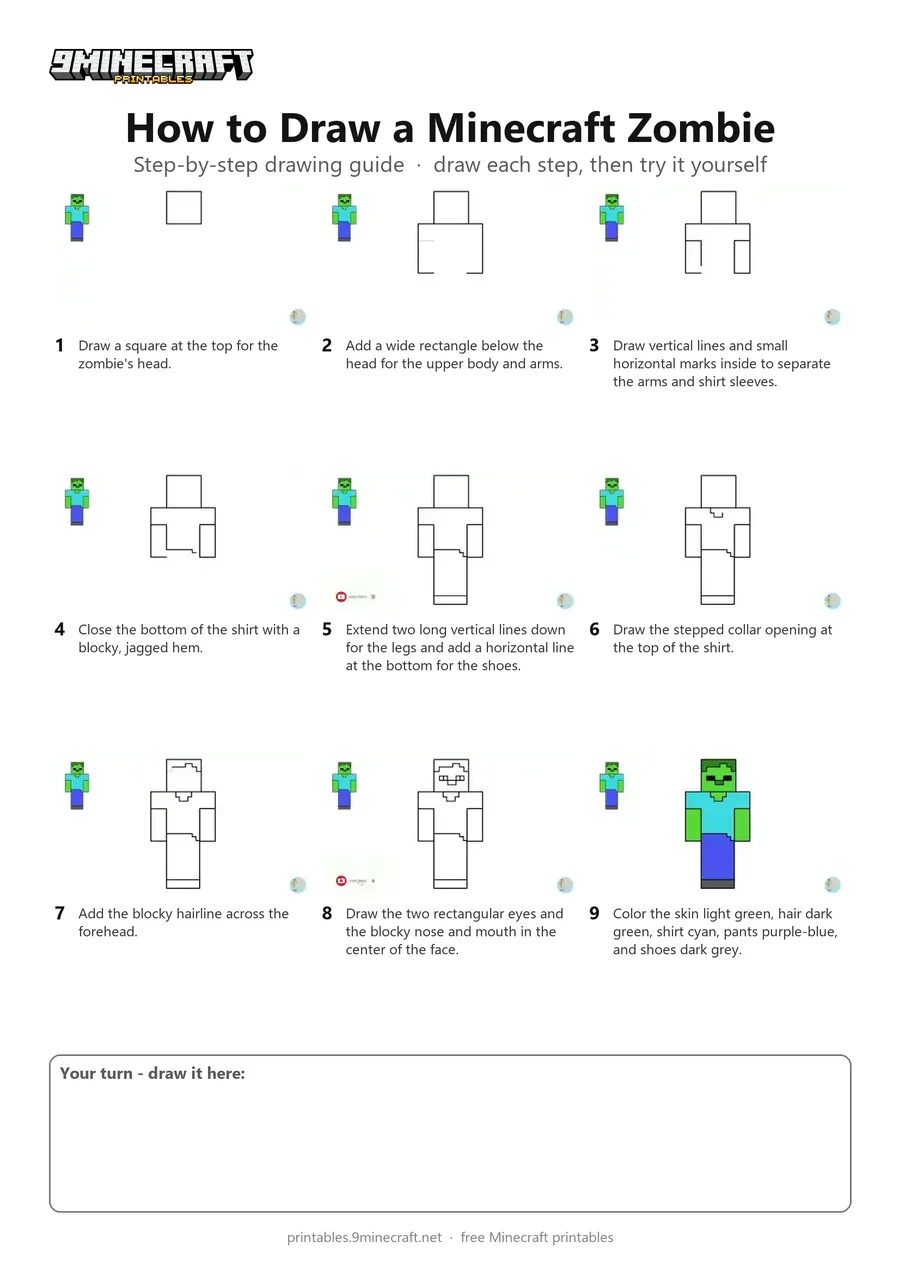
Learn how to draw a flat, blocky Minecraft Zombie standing upright using simple straight lines. Each part of the body and face is added line-by-line before coloring it in with green, cyan, and purple. Free printable PDF for A4 and US Letter paper.
Print at 100% scale (“Actual size”). Plain printer paper works fine; crayons, colored pencils or markers all work.
 Draw a square at the top for the zombie's head.
 Add a wide rectangle below the head for the upper body and arms.
 Draw vertical lines and small horizontal marks inside to separate the arms and shirt sleeves.
 Close the bottom of the shirt with a blocky, jagged hem.
 Extend two long vertical lines down for the legs and add a horizontal line at the bottom for the shoes.
 Draw the stepped collar opening at the top of the shirt.
 Add the blocky hairline across the forehead.
 Draw the two rectangular eyes and the blocky nose and mouth in the center of the face.
 Color the skin light green, hair dark green, shirt cyan, pants purple-blue, and shoes dark grey.
You need: pen, markers.
Video by DrawWithMe on YouTube.
 More How to Draw
 PDFHow to Draw a Minecraft Zombie (Design 2)Simple · Ages 7-9
 PDFHow to Draw a Minecraft Zombie (Design 4)Simple · Ages 7-9
 PDFHow to Draw Alex from MinecraftSimple · Ages 7-9
 PDFHow to Draw Alex from Minecraft (Design 3)Simple · Ages 7-9
 PDFHow to Draw Alex from Minecraft (Design 4)Simple · Ages 7-9
 PDFHow to Draw a Minecraft ChestSimple · Ages 7-9
 PDFHow to Draw a Minecraft Copper GolemSimple · Ages 7-9
 PDFHow to Draw a Minecraft Creeper (Design 2)Simple · Ages 7-9
 PDFHow to Draw Minecraft a CreeperSimple · Ages 7-9
 PDFHow to Draw a Cute Minecraft ZombieCute / chibi · Ages 7-9
 PDFHow to Draw Minecraft an Enderman Holding a Grass BlockSimple · Ages 7-9
 PDFHow to Draw Minecraft an EndermanSimple · Ages 7-9