
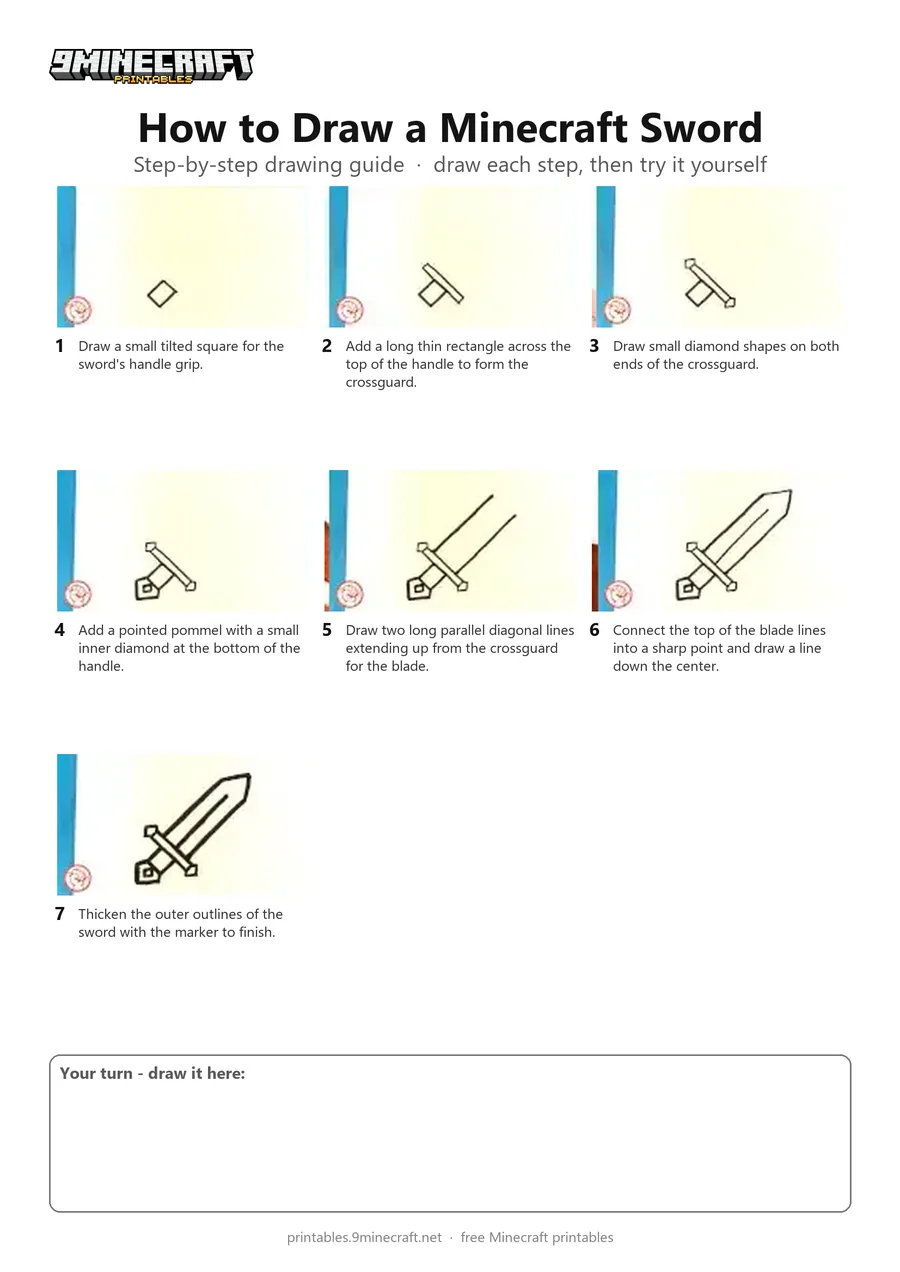
This tutorial shows how to draw a simple stylized Minecraft sword using a black marker. Starting from the handle and crossguard, the drawing builds out the diagonal blade with a center ridge and bold outlines. Free printable PDF for A4 and US Letter paper.
Print at 100% scale (“Actual size”). Plain printer paper works fine; crayons, colored pencils or markers all work.
 Draw a small tilted square for the sword's handle grip.
 Add a long thin rectangle across the top of the handle to form the crossguard.
 Draw small diamond shapes on both ends of the crossguard.
 Add a pointed pommel with a small inner diamond at the bottom of the handle.
 Draw two long parallel diagonal lines extending up from the crossguard for the blade.
 Connect the top of the blade lines into a sharp point and draw a line down the center.
 Thicken the outer outlines of the sword with the marker to finish.
You need: paper, black marker.
Video by EasyPicturesToDraw on YouTube.
 More How to Draw
 PDFHow to Draw Alex from MinecraftSimple · Ages 7-9
 PDFHow to Draw Alex from Minecraft (Design 3)Simple · Ages 7-9
 PDFHow to Draw Alex from Minecraft (Design 4)Simple · Ages 7-9
 PDFHow to Draw a Minecraft ChestSimple · Ages 7-9
 PDFHow to Draw a Minecraft Copper GolemSimple · Ages 7-9
 PDFHow to Draw a Minecraft Creeper (Design 2)Simple · Ages 7-9
 PDFHow to Draw Minecraft a CreeperSimple · Ages 7-9
 PDFHow to Draw a Minecraft Diamond Sword (Design 3)Pixel style · Ages 7-9
 PDFHow to Draw Minecraft an Enderman Holding a Grass BlockSimple · Ages 7-9
 PDFHow to Draw Minecraft an EndermanSimple · Ages 7-9
 PDFHow to Draw a Minecraft Grass BlockSimple · Ages 7-9
 PDFHow to Draw Herobrine from MinecraftSimple · Ages 7-9