
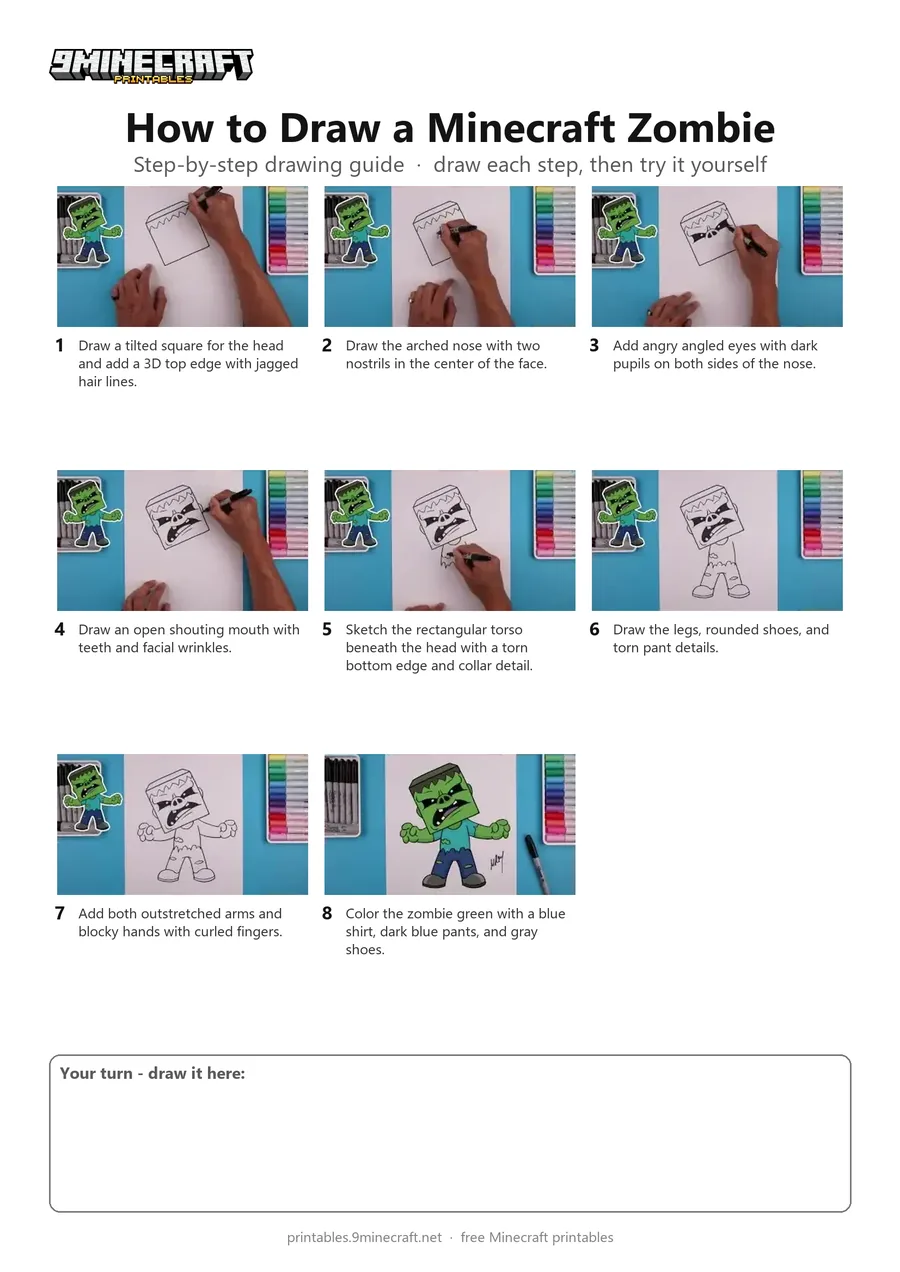
Learn how to draw a cartoon-style Minecraft Zombie with a tilted blocky head and torn clothes. This tutorial uses a black marker for the line art and colored markers to shade the finished character. Free printable PDF for A4 and US Letter paper.
Print at 100% scale (“Actual size”). Plain printer paper works fine; crayons, colored pencils or markers all work.
 Draw a tilted square for the head and add a 3D top edge with jagged hair lines.
 Draw the arched nose with two nostrils in the center of the face.
 Add angry angled eyes with dark pupils on both sides of the nose.
 Draw an open shouting mouth with teeth and facial wrinkles.
 Sketch the rectangular torso beneath the head with a torn bottom edge and collar detail.
 Draw the legs, rounded shoes, and torn pant details.
 Add both outstretched arms and blocky hands with curled fingers.
 Color the zombie green with a blue shirt, dark blue pants, and gray shoes.
You need: paper, black marker, colored markers.
Video by Cartooning Club How to Draw on YouTube.
 More How to Draw
 PDFHow to Draw a Minecraft Chest Folding SurpriseCartoon · Ages 7-9
 PDFHow to Draw a Blastling from Minecraft DungeonsCartoon · Ages 7-9
 PDFHow to Draw Minecraft a Chicken JockeyCartoon · Ages 7-9
 PDFHow to Draw a Minecraft CreeperCartoon · Ages 7-9
 PDFHow to Draw a Minecraft Creeper (Design 5)Cartoon · Ages 7-9
 PDFHow to Draw Dennis the Wolf from A Minecraft MovieCartoon · Ages 7-9
 PDFHow to Draw Minecraft an Ender Dragon Surprise FoldCartoon · Ages 7-9
 PDFHow to Draw Minecraft an Ender Dragon Surprise Fold (Design 2)Cartoon · Ages 7-9
 PDFHow to Draw Minecraft an Enderman (Design 7)Cartoon · Ages 7-9
 PDFHow to Draw Minecraft an Exploding Creeper Folding SurpriseCartoon · Ages 7-9
 PDFHow to Draw a Minecraft Ghast (Design 4)Cartoon · Ages 7-9
 PDFHow to Draw Minecraft HerobrineCartoon · Ages 7-9