
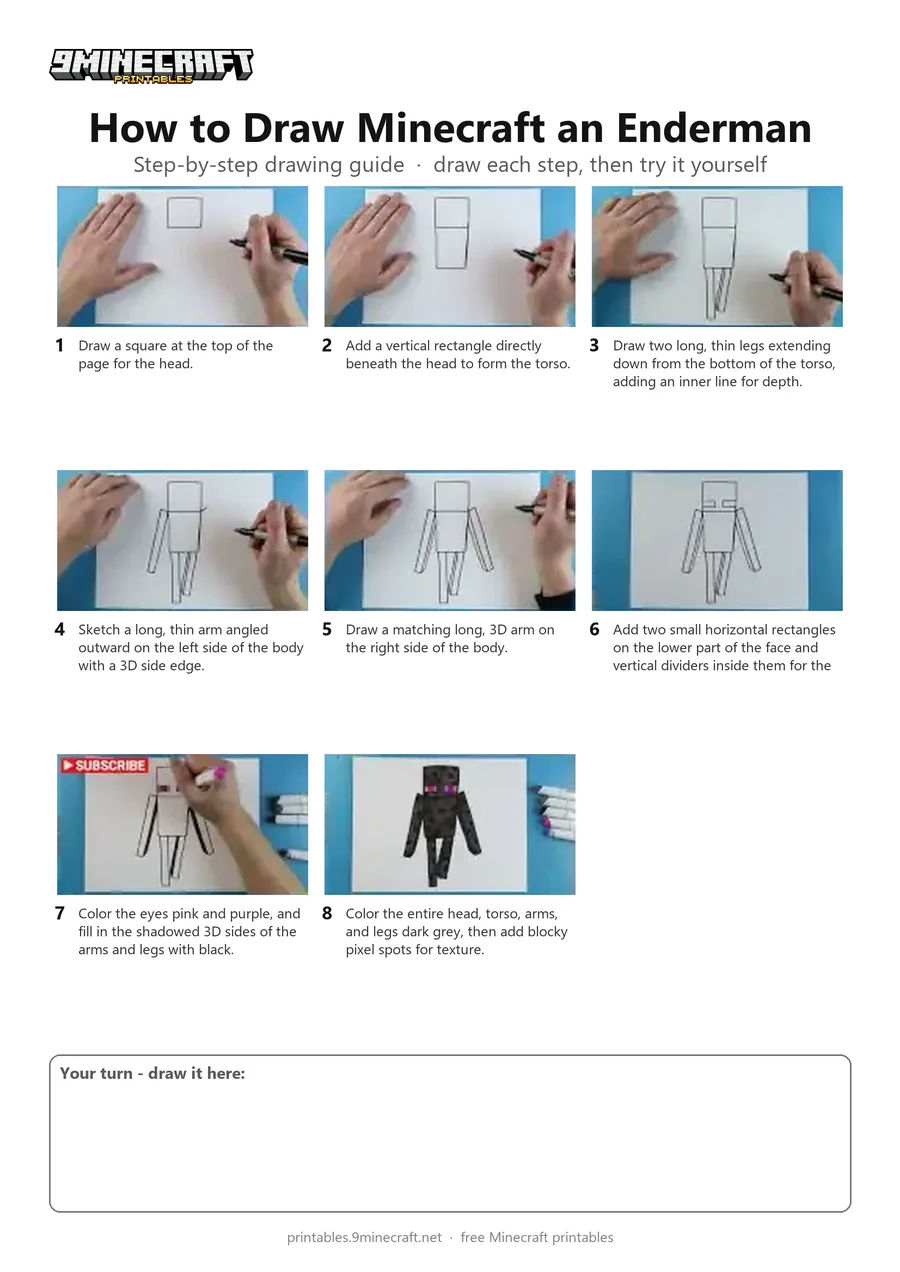
This tutorial shows how to draw a simple blocky Minecraft Enderman standing upright with long arms and legs. The drawing is outlined with a black marker and colored in with dark grey, black, and purple markers for the glowing eyes and pixel texture. Free printable PDF for A4 and US Letter paper.
Print at 100% scale (“Actual size”). Plain printer paper works fine; crayons, colored pencils or markers all work.
 Draw a square at the top of the page for the head.
 Add a vertical rectangle directly beneath the head to form the torso.
 Draw two long, thin legs extending down from the bottom of the torso, adding an inner line for depth.
 Sketch a long, thin arm angled outward on the left side of the body with a 3D side edge.
 Draw a matching long, 3D arm on the right side of the body.
 Add two small horizontal rectangles on the lower part of the face and vertical dividers inside them for the eyes.
 Color the eyes pink and purple, and fill in the shadowed 3D sides of the arms and legs with black.
 Color the entire head, torso, arms, and legs dark grey, then add blocky pixel spots for texture.
You need: paper, black marker, colored markers.
Video by Art Land on YouTube.
 More How to Draw
 PDFHow to Draw Minecraft an Enderman Holding a Grass BlockSimple · Ages 7-9
 PDFHow to Draw Minecraft an EndermanSimple · Ages 7-9
 PDFHow to Draw Minecraft an Enderman (Design 8)Simple · Ages 7-9
 PDFHow to Draw Enderman Step-by-Step GuideSimple · Ages 7-9
 PDFHow to Draw Alex from MinecraftSimple · Ages 7-9
 PDFHow to Draw Alex from Minecraft (Design 3)Simple · Ages 7-9
 PDFHow to Draw Alex from Minecraft (Design 4)Simple · Ages 7-9
 PDFHow to Draw a Minecraft ChestSimple · Ages 7-9
 PDFHow to Draw a Minecraft Copper GolemSimple · Ages 7-9
 PDFHow to Draw a Minecraft Creeper (Design 2)Simple · Ages 7-9
 PDFHow to Draw Minecraft a CreeperSimple · Ages 7-9
 PDFHow to Draw Minecraft an Enderman (Design 2)Simple · Ages 4-6